Overview
I had an opportunity to try DToC: Dynamic Table of Contexts, so this is a memorandum.
https://www.leaf-vre.org/docs/features/dtoc
The machine-translated description is as follows:
It brings innovation to electronic reading by combining the power of semantic markup with book navigation features. The traditional overview functions of printed books – the table of contents and keyword index – are dynamically integrated with full-text search and tag-based indexing features, creating a new reading experience.
I was ultimately able to produce the following visualization.
https://dtoc.leaf-vre.org/view?document=https://dtoc-demo.vercel.app/P-III-b-1189/dtoc.json
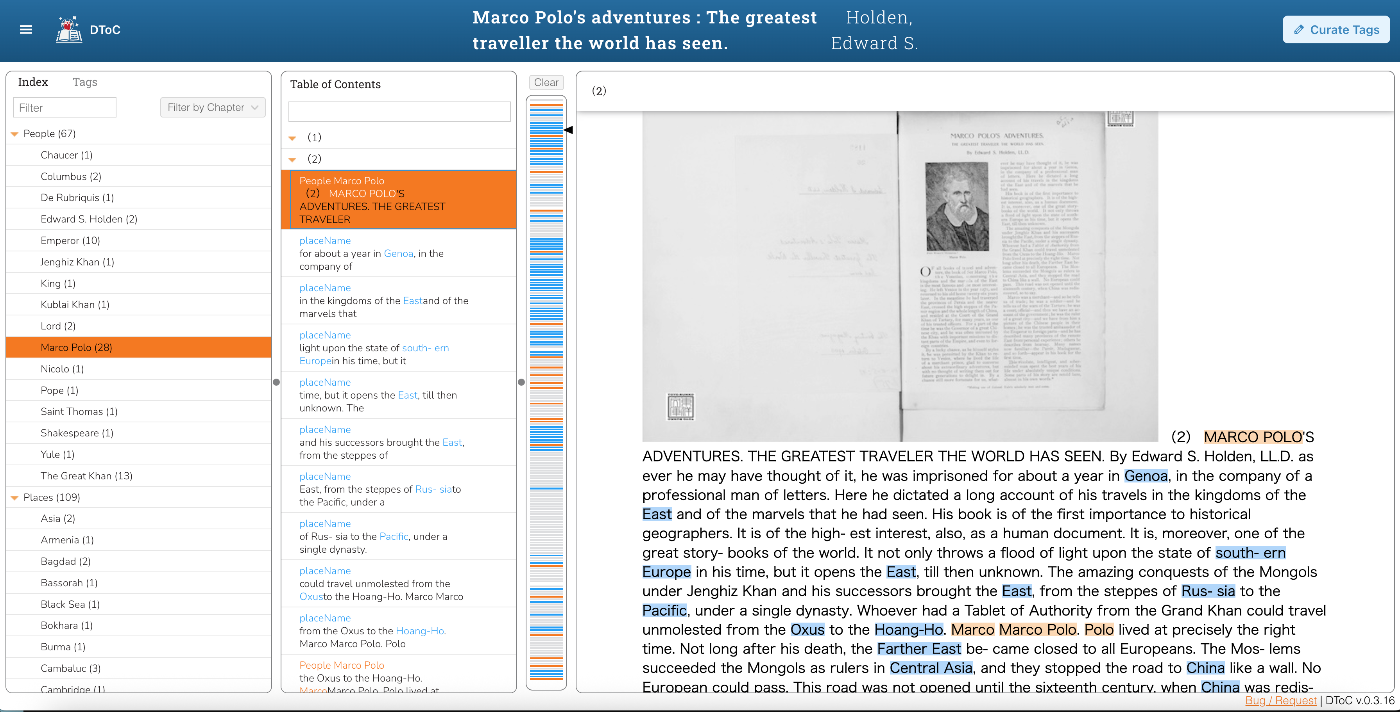
Target Data
I used “Marco Polo’s adventures: The greatest traveller the world has seen.” from the Morrison Pamphlets held by the Toyo Bunko library as sample data.
https://www.toyo-bunko.org/open/show_detail_open.php?targetid=363479
https://www.toyo-bunko.org/morisonp2015/morisonpocr2016_showimg.php?tgfn=P-III-b-1189&tgfn2=01Geo01
Background
I participated in the following workshop and learned how to use DToC.
https://github.com/LEAF-VRE/dh2025_workshop
The following tutorial was also helpful.
https://www.leaf-vre.org/docs/training/tutorials/dtoc-tutorial
Creating the Main XML
First, create the main XML file. It can be viewed at the following URL.
https://dtoc-demo.vercel.app/P-III-b-1189/main.xml
OCR
OCR was performed using Azure AI Document Intelligence.
https://azure.microsoft.com/en-us/products/ai-services/ai-document-intelligence
Proofreading & Tagging
For proofreading the OCR results and tagging person names and place names, “Google: Gemini 2.5 Pro” was used.
https://deepmind.google/models/gemini/pro/
Since this was done through automated processing, there is a high possibility of errors, but I was able to prepare a TEI/XML file for use with DToC.
Creating the Index XML
I referenced the following:
https://www.leaf-vre.org/docs/training/tutorials/dtoc-tutorial#step-2-create-an-index
“Google: Gemini 2.5 Pro” was also used for creating this index, which was mechanically generated from the previously created main.xml. The result is as follows:
https://dtoc-demo.vercel.app/P-III-b-1189/index.xml
Creating the JSON File
A JSON file is created for loading into DToC. This part could be done through the GUI. The final result is as follows:
https://dtoc-demo.vercel.app/P-III-b-1189/dtoc.json
First, access the following and log in with a GitHub account.
Then access the following:
https://dtoc.leaf-vre.org/view
Then, referencing tutorial materials, enter the required fields.

For Documents, enter the URL of the XML file created in the previous process.
In Corpus Parts, specify which parts of the XML file to use. For Corpus Part, I used XPath to specify div tags in main.xml, and for Corpus Index, I specified div tags in index.xml.
For Formatting, images to display are specified using XPath. An example of the figure description in main.xml is as follows:
For the final Curation section, configure it from the following GUI. From the “Curate Tags” button at the top right of the next page, specify elements to highlight using XPath.

With these settings, Index and Tags become available, and the corresponding text is highlighted.

Summary
I found this to be a powerful tool for visualizing TEI/XML files.
On the other hand, as of July 16, 2025, TEI/XML containing Japanese was not displayed correctly.
https://gitlab.com/calincs/cwrc/dtoc/dtoc-commons/-/issues/13
Once this issue is resolved, I would like to try applying it to Japanese text as well.