Overview
I previously explained how to use Roma in the following article.
This time, I will explain the workflow for creating TEI ODD (One Document Does-it-all) and documentation (HTML and PDF) targeting TEI/XML files at hand.
Note that at the end of this article, I have included GPT-4’s response regarding the differences between ODD (One Document Does it all) and RNG (RelaxNG). Please refer to that as well.
Obtaining a List of Tags Used
First, obtain a list of tags used in your project.
For this purpose, I created a library and a tutorial notebook for extracting the list of tags used in TEI/XML files at hand.
Library
https://nakamura196.github.io/gdb-utils/
Tutorial notebook
For example, running the above notebook produces results like the following. The table below shows the tags and their frequencies found in the target TEI/XML files, sorted in ascending order by tag name.
| index | Tag | Count |
|---|---|---|
| 0 | TEI | 1 |
| 18 | addrLine | 1 |
| 17 | address | 1 |
| 50 | app | 8 |
| 5 | author | 2 |
| 58 | back | 1 |
| 36 | bibl | 1 |
| 47 | body | 1 |
| 56 | closer | 1 |
| 44 | correspAction | 2 |
| 43 | correspDesc | 1 |
| 20 | country | 1 |
| 33 | date | 6 |
| 26 | dimensions | 1 |
| 19 | district | 1 |
| 54 | div | 1 |
| 37 | editor | 1 |
| 40 | editorialDecl | 1 |
| 39 | encodingDesc | 1 |
| 25 | extent | 2 |
| 2 | fileDesc | 1 |
| 29 | handDesc | 1 |
| 30 | handNote | 1 |
| 27 | height | 1 |
| 31 | history | 1 |
| 21 | idno | 2 |
| 16 | institution | 1 |
| 55 | lb | 13 |
| 51 | lem | 8 |
| 59 | listPerson | 1 |
| 12 | listWit | 1 |
| 45 | location | 1 |
| 14 | msDesc | 1 |
| 15 | msIdentifier | 1 |
| 23 | objectDesc | 1 |
| 48 | opener | 1 |
| 32 | origin | 1 |
| … |
Creating an ODD File with Limited Tags Using Roma
Using a tool called Roma, create an ODD file limited to the tags obtained above.
For how to use Roma, please refer to the following article.
Specifically, you check the boxes for the tags you want to use (in the example below, address and addrLine).

At this point, manually checking each tag from the previously listed tags one by one is time-consuming. Therefore, the library includes a function to generate a script that automates this. The notebook also includes an execution example, and you can obtain a script like the following.
If you are using Google Chrome, open “Developer Tools,” go to the “Console” tab, and paste the above script.

As a result, the listed tags are automatically checked.
Saving the ODD File
After completing the above steps, click “Customize as ODD” to download the ODD file. You can upload this file to Roma again to continue customization.

Obtaining the Documentation (HTML Version)
Also, clicking “Documentation (HTML version)” will download an HTML file. Opening this file in a browser displays a list of descriptions limited to the selected tags, as shown below.
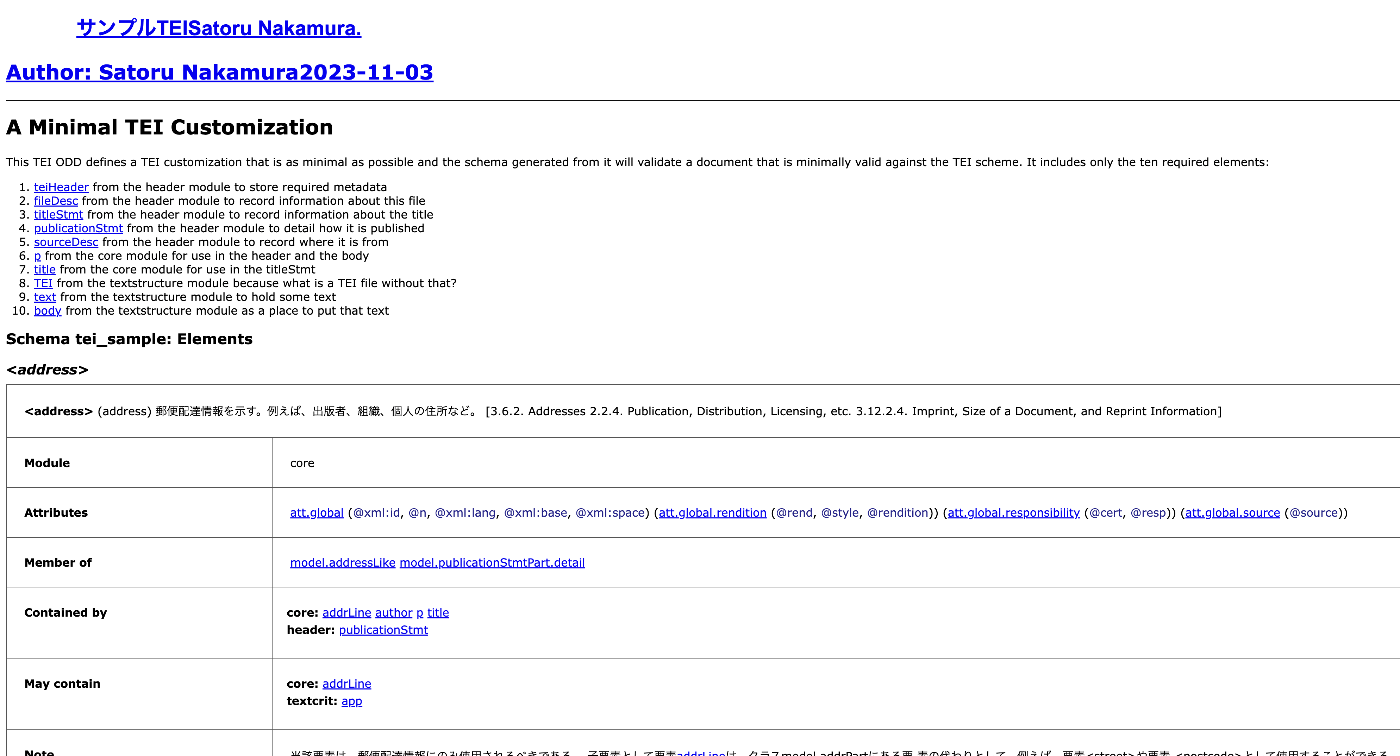
This file can potentially be shared with TEI/XML file editors as a substitute for a manual.
Using the RNG File
Roma also provides a RELAX NG Schema download option. As introduced in the following article, by adding a reference to this file in your TEI/XML file, it can be used for validation in editors such as VSCode and Oxygen XML Editor. Specifically, entering a tag not included in the ODD will cause an error to be displayed.
Summary
My understanding of ODD is still incomplete in many areas, and there may be inaccurate descriptions. However, I hope this provides useful reference for creating and applying ODD files.
In the future, I would like to continue experimenting with customizing attributes of each element and customizing the values that can be entered for specific attributes.
Reference: Differences Between TEI ODD and RNG (Response by GPT-4)
TEI (Text Encoding Initiative) is a set of markup language guidelines for the digitization of scholarly texts and electronic text research. It is based on XML (Extensible Markup Language). Two different technologies are related to TEI customization: ODD (One Document Does it all) and RNG (RelaxNG). Below is an explanation of each.
ODD (One Document Does it all):
- ODD is a customization mechanism for TEI. It is like a specification document for customizing TEI elements and attributes, and specific customized schemas are generated based on these specifications.
- ODD combines human-readable documentation and machine-readable schema information in a single document.
- Using ODD, you can add, modify, or remove TEI elements and attributes.
- From ODD, you can convert to various schema language formats, such as RelaxNG, W3C XML Schema, DTD, etc.
RNG (RelaxNG):
- RelaxNG is one of the schema languages for defining the structure of XML documents. RNG has two syntaxes: an XML-based syntax (RelaxNG XML syntax) and a non-XML compact syntax (RelaxNG Compact syntax).
- RelaxNG provides a simpler way to define the structure and content of XML documents compared to the original DTD or W3C XML Schema.
- After customizing with TEI ODD, it is common to generate a RelaxNG schema based on that ODD.
In summary, ODD is a specification-like entity for defining TEI customizations, and from that ODD, you can convert to specific schema formats such as RNG.