Overview
I created a plugin for Mirador 3 (actually Mirador 4) that disables zoom operations.
https://github.com/nakamura196/mirador-disable-zoom/
Here is a demo video.
You can try it at the following URL.
https://nakamura196.github.io/mirador-disable-zoom/
This plugin is based on the following plugin created by UCLA Library for Mirador 2.
https://github.com/UCLALibrary/mirador-disable-zoom
This time, I will note some findings from developing this plugin.
Specifying the Target
The target property allows you to specify where to place the plugin button. In this case, by specifying WindowTopBarPluginArea, I was able to display the icon directly on the per-window bar.
https://github.com/nakamura196/mirador-disable-zoom/blob/main/src/index.js
On the other hand, the plugin introduced in the following article specifies WindowTopBarPluginMenu.
In that case, a three-dot menu is displayed, within which icons and other elements for each plugin can be shown.
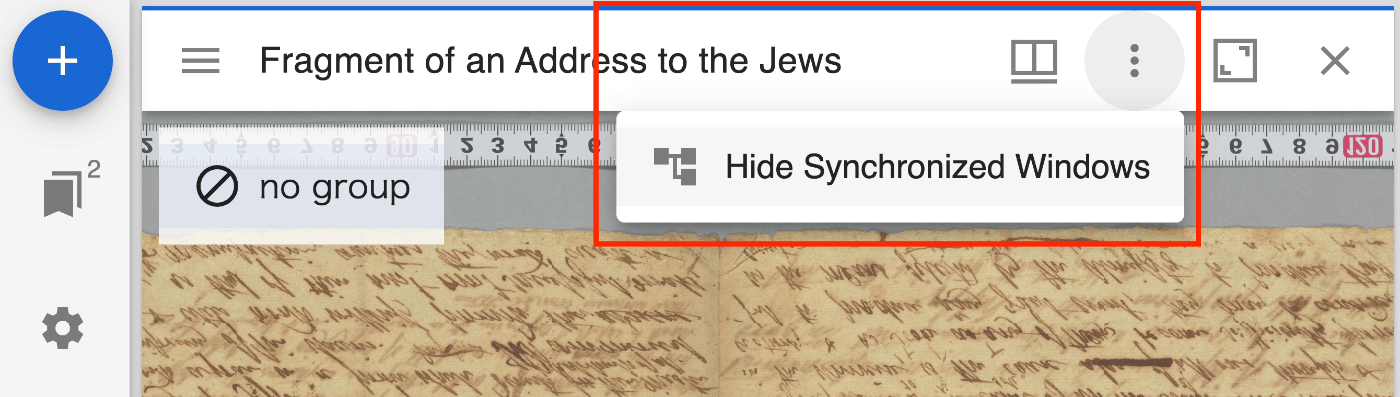
It seems that targets can be used differently depending on the use case.
These targets appear to be able to use the components specified in the following directory.
https://github.com/ProjectMirador/mirador/tree/master/src/containers
Translations
In the above code, the translations property is specified in the config attribute.
Without specifying the above, the translation data defined in translations.js in the same folder was not applied.
Summary
I hope this serves as a useful reference for using and developing plugins.