Overview# This is a memo about running the NDLOCR application published by NDL (National Diet Library) using a virtual machine on GCP (Google Cloud Platform). For details about this application, please refer to the following repository.
https://github.com/ndl-lab/ndlocr_cli
Creating a VM Instance# Access Compute Engine on GCP and click the “Create Instance” button at the top of the screen.
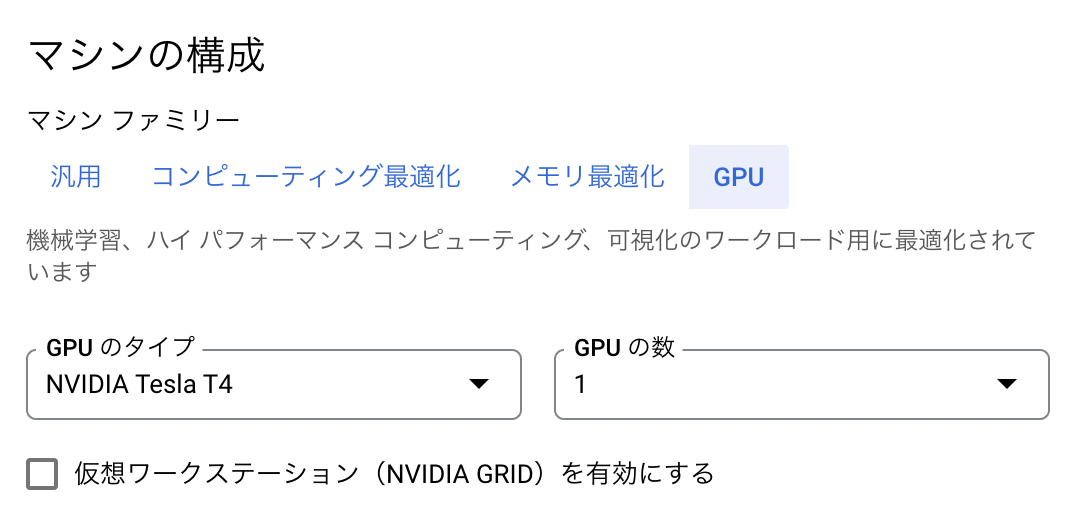
Under “Machine configuration” > “Machine family”, select “GPU”. Then for “GPU type”, select “NVIDIA T4”, which is the most affordable option. Set “Number of GPUs” to 1.
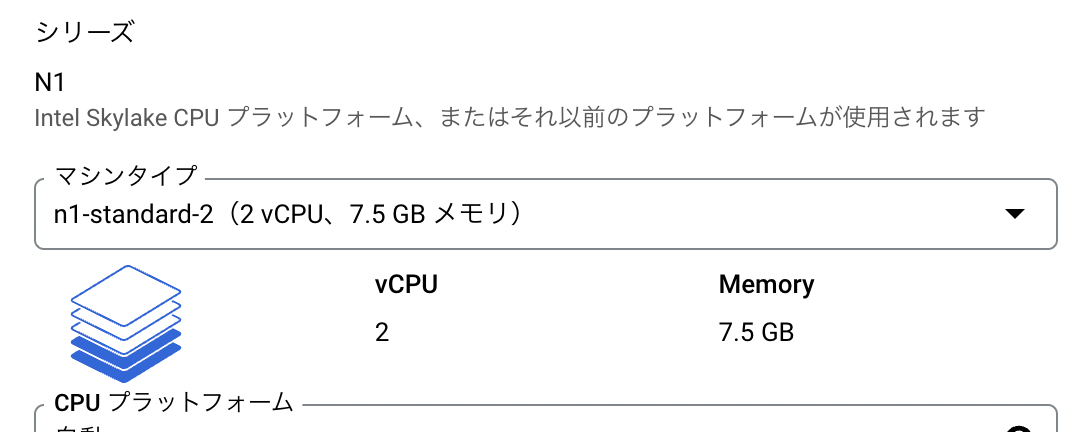
For “Series”, select “n1-standard-2”.
With “n1-standard-1”, a MemoryError occurred as shown below.
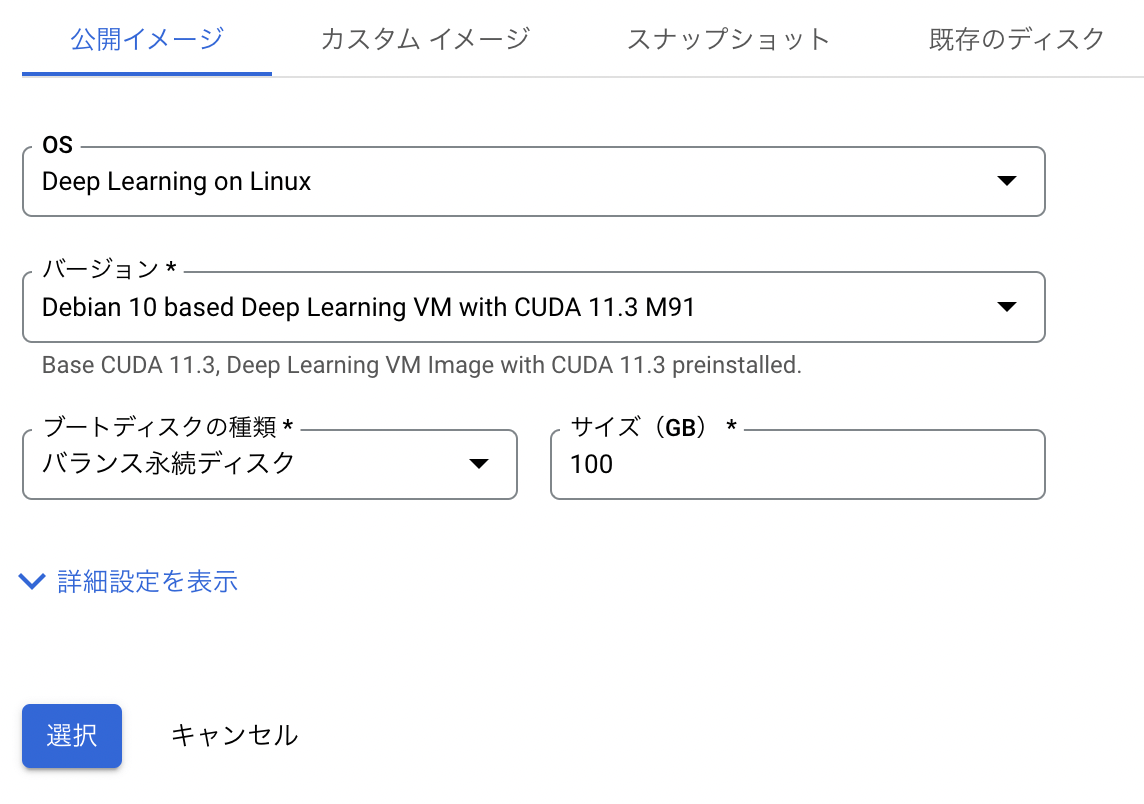
Next, under “Boot disk”, select “Switch image”. Then select the recommended “Deep Learning on Linux”.
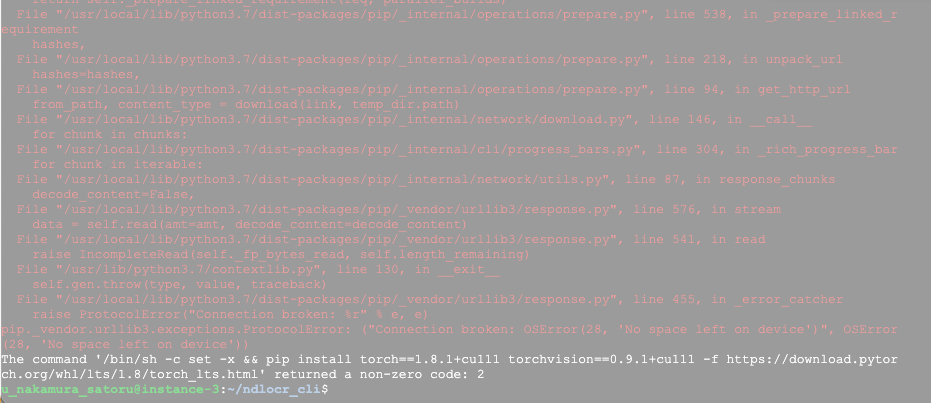
An important note here: change the “Size” from the default 50GB to 100GB. With 50GB, a “no space left” error occurred.
The following shows the information after the environment setup was completed. Since over 40GB was already used, I recommend setting a generous “Size”.
u F u t / t t t / t _ i d m d m m m d m n l e p e p p p e p a e v f v f f f v f k s s / s s s / s a y s s m s d d u t a a r e 1 1 a m 5 _ s a t o r u S 7 1 4 7 5 7 1 1 @ i . . 9 . . . 2 . i z 4 5 2 4 0 4 4 5 n e G G G G M G M G s t a U 8 5 n s . 4 . c e 4 1 7 e d 0 M G 0 0 0 M 0 - 4 A : v 7 1 4 7 5 7 1 1 ~ a . . 3 . . . 1 . $ i 4 5 2 4 0 4 9 5 l G G G G M G M G d f U s - e 0 1 9 0 0 0 5 0 h % % % % % % % % % M / / / / / / / d r d r s b r u e u e u y o u n v n v n s n t / / t e s l f u d h o s e s m c / f e o k c i r n g / r 1 o 0 u 0 p 1 After that, click the “Create” button at the bottom of the screen to complete the VM instance creation.
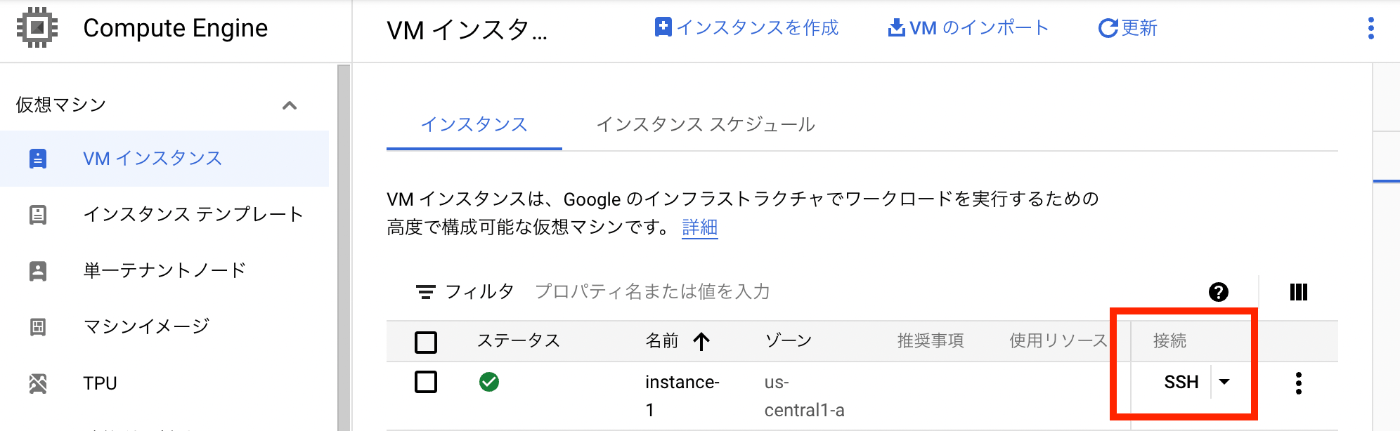
After a while, the VM instance will start up as shown below. Click the “SSH” button to connect to the VM instance.
Operations Inside the VM Instance# Installing the Nvidia Driver# After connecting via SSH, the following screen is displayed. Press “y” to install the Nvidia driver.
= W = V B R o T s L _ T t i D p T W = e = e a e n o u i 6 h h n e e h o = l = r s s s d n 4 e e d b r i u = c = s e o G G G r o u i i m s l = o = i d u t o o e x p e v a i d = m = o r o a o o i r x i n t V = e = n o c g g g g n o i o a d t M y = = : n e l g l l s p n g c u G e o = t = : s e e e e t t s r t a N d r u = o = c : d a / t a l U e = = o D D / C G l d a m d / b q l = t = m e e g l r l e n s i f L y u i = h = m b e o o o e c s i i i k = e = o i p o u u N p e i t l n a r e = = n a g d p v l - n r e u p e = G = - n L l : i e 1 c i s x p s t = o = c e e D d a l b l o = o = u G a - o h i r 4 u u i c i N = g = 1 N r d c t a n . d t n o c v i = l = 1 U n l u t i 1 e i m a i n = e = 3 i - m p d n 9 d o / e b d s = = . L n p e s r g . n u s l i t = D = m i g l n : i 0 w s e a a = e = 9 n a t / i - i t r w l = e = 1 u P t a / e n 1 t e / i l d l = p = x l f t g r s 9 h r s t a r = = a o i r t - m h h w i t = L = 1 t r o o ( a c t s a . v h = e = 0 f m n u i l l h r A e e = a = o : p f l o e f e B r = r = ( r s - u o / S s N = n = b m h . n d d D r d O v = i = u t g e r - e o L t i = n = s S t o e i a b e c U o d = g = t t p o d v m i a / T i = = e a s g e e d a c * E f a = V = r c : l d r 6 n h / L u = M = ) k / e ) . 4 c Y n d O / . s G p o c r ( v c c r h # N r p N t i G e l o u 1 U y O i v N r o m n g r o e U f u / : S L r i W n r / l d f M i a g A ? L o . o P n m h R c i w g r u t R o [ n : o u D x a . A r y u o m e r N r / x h g / b s e T e n t l # i y Y c ] 4 t e ! a s d , t . p . f n t e l 1 s c o e s t y 9 : o r 4 m c o . . / m u . r 0 / / m 1 a i t - s d / 9 r b h 1 t e g . e e e I 9 a e o 2 d n - c p o 3 f e s c k - g 2 r i x t l o l l - e n t a o v e e 1 e e l u e a - t n l d r r d ( s h t a - f n l 2 o e t a l i - 0 f i m o n p 2 t o d w g l 2 w n 6 . - a - a 4 c v t 0 r t o m f 3 e a x m o - ; k 8 / r 0 e 6 q m 7 s _ u ) 6 e ~ 4 s x 1 \ t 8 n i 6 m i n u t e . However, running this immediately after startup resulted in the following error.
W I w i E E N o n a n : : v u s i s i l t t t C U d d a a o n i l a l u a a y l p l l b o i t d l d u n l e r g l i n i l o n o t v i N c u t o e k v k x r e i s g a d h e c i t i r e t q n o a e a u s l d l i t i d e e o r a n r a r c e l s i s s k l t v e : t e a e d h d l r l v e . l . i a n r d t u / p h x l k e - i g h b N e / f v a d r i d p o d e k n i r g t a s / e - l n d 4 o d r . c i 1 k l v 9 - o e . f c r 0 r k ? - o 1 n [ 9 t y - e v / c n a n l d r ] o / u - l y d i - o b a p / m e d d n p 6 k 4 ( g 1 / 1 l : o c R k e - s f o r u o r n c t e e n t d e ) m , p o i r s a r a i n l o y t h u e n r a v p a r i o l c a e b s l s e ) u s i n g i t ? Running the following ps command showed that other processes were running.
p s a u x | g r e p a p t
Therefore, exit once, wait a moment, and then reconnect via SSH. You will be asked the same question, and pressing “y” again completed the installation as follows.
W I w i R B R l 0 D D - V U W W N o n a n e u e i R o 4 e n A A v u s i s a i a n u I w 7 r c R R i l t t t d l d u p V n 0 i o N N d d a a i d i x g E l . f m I I i l a l n i n - r R o 5 y p N N a y l p l g n g h a _ a 7 i r G G o i t g e d V d . n e : : d u n l p s a e E i 0 g s r g l i a d t d d R n 2 s T i n X d i l o n c e a e , S g . a i h n v / i v i N c u k p t r I r r n e s i u d s e k v k x a e e s 0 O d u c g t d s r t r e i s g n - N r n h n a i r i r d h e d i 4 n : i i N v l a / v i i t i r e e n . e v v V i l - l e b n o a e a l n f 1 w 4 e e I d a i i r u s l d i c o 9 l 7 r D i t n b t t i d e e s y r . y 0 i I a i s 6 m i a n r a r t m 0 . f n A - o t 4 o l s i s s s t a - i 5 r t d n a d n l t v e : . r t 1 n 7 o e A r l x u e a e d . e i 9 s . m g c m o l o l a d l r l . e o - t 0 r c f e r e n . l . i n c a 2 G i e m r g , d n D . l l C t l o t / t u o . o l S y e d h w m p r h x n . u e . r u e a o l e e - e d d l . a l s d e i h D - , o . t e N u a n N e o a c e V f l s s v a n m 0 a O d w I o e e t i d e d t K i D r s a d e 6 t i G l I c ' i l i r 4 o o r l A e ; n l a s n a d s - i r p n d t t t d 4 s e a h o r t h a h r . m n i t i o e l e i 1 a o d c v s l v 9 l v s b e g e d e . r e i e r u t r r 0 e n D . e p h i ? - a a s r i s a e v 1 d n t i n s t e [ 9 y d a v s h ` r y - l e t t s p . / c t 1 l r a h k n l h : l e w g ] o e n f l e - u o g o e X r c y d n t s r d e o - e : . l n a w u / L i n f m e p / i A b o i d s g n n s r t g 6 t r v u a ` 4 a i x a r q v d d - y u u e e i x r e t r d a 8 e p r i s . - 6 s a y l i d _ u t a i o r 6 l h b t n i 4 t l y v , e ( e 4 / a 4 r 7 D u f n . s 0 R s r d 1 - . M r 9 u 5 - m t . s 7 K l h 2 - . M i t e 3 p 0 S b h 2 u 2 6 e X - b . w 4 . 1 l . i ' s O ) i . l y r . c . l a s g / . n t t . n d e S e . o m D s . t X . K l . / a . f m d / . u o I e 4 . n d f v 7 . c u e 0 . t l X l . . i e o 5 . o f p 7 . n p a m . . a i e 0 . w t l n 2 . i h s t / . t N . h t p V . o a I . t c D . h f k I . i i a A . s n g - . d e L . i . t f n . h o u . e r x . - . N y x . V o 8 . I u 6 . D r _ . I 6 . A 4 . I did not understand the meaning of the above WARNINGs, so I ignored them…
Starting the Docker Container# From here on, I could proceed following the GitHub README.md.
Since docker and git were already installed, I ran the following. Note that running dockerbuild.sh takes some time.
g c s s i d h h t n c d / l l d d o o o o n c c c e r k k _ e e c r r - l / / r i d r e o u c c n u k _ r e d s r o i b c v u k e i e l r h d . t . s t s h p h s : / / g i t h u b . c o m / n d l - l a b / n d l o c r _ c l i Running Inference# This could also be done following the README.md.
This time, I ran inference on page 4 of “Koui Genji Monogatari, Volume 1”.
https://dl.ndl.go.jp/info:ndljp/pid/3437686/4
# d o L c o k g e r i n e x t e o c t - h i e - c t o n t - a u i s n e e r r r o o t o c r _ c l i _ r u n n e r b a s h Try running inference inside the container.
# w # p g y D e R t o t u h w n o n h n l t i o t n m a p f a d s e i : r n a / e . n / n p w c y i w e m w i a . ( n g d w f e l i e . t r t n h o d s l - a s . x m a g p m o o l p . p e l j t _ e p i d _ / o a d a n t a p a t i t a o o i u i i a t m i l p g f s u / o t 3 _ 4 o d 3 u i 7 t r 6 p 8 u - 6 t x / R r 0 e 0 c 0 o 0 g 0 n 0 i 4 t / i f o u n l l r / e f s u u l l l t / 0 x / m d l e f f a i u l l e t s . ) j p g - P s a m p l e _ d a t a / i m g / The inference runs as follows.
r s i o c U l s l N N m l [ { # # 1 i # # # / i # # # T { T { N { # # = A o t n u o s o e o o o o o { ' # # / m # # # u l # # # h ' h ' o ' # # = v o a p t n i a t a d a ' i # # 1 g # # # s e ' # # # i T i T T # # = e t r u p f n d d T S e d i n # r . d s Y s Y p Y # = r @ t t u i g u r e l i n p # P [ 0 P P L a L L L P P r P # s = a f _ t g f p c a q n p u # a = a a a l t a i i B E B E e E # a = g d i r _ _ T r h n u i g u t # g = t g g y o a y n n L ' L ' d ' # v = e 3 n o r f e o E e s e n t _ # e = o e e o c o e e O : O : i : # e = 5 f o o i n m Q c f n p p _ d = p u a p u C C c = p b e t o l s L k o c u r d i S S = D D t l i t O O K ' K ' t ' x = r 6 r t e o c p r e t e i r T e = c e e / p C C 図 図 e 図 E m = o 2 e : r o o m M t r ' A p = o s s E l e E R R e 版 e 版 d 版 N l = c f n : : F n v i a o p r ' : R a = n k k x i l x l ' l ' ' D = e e c s l f e n t d a a : T r = f e e t b i t P P e , e , S , : = s f e a o c o i r t i e r i a = : w w r / n r r r m m T P = s 6 m u o w g s o l a n P t = a p e a o o e ' e ' R ' A / = i 1 ! p t n = i f n i m e r A i = 0 P P c y c c c t X t X I X G r = n : l p f b s o r n e d r o G o = . r r t t i t e e n ' n ' N ' E o = g ~ e u i a r n o m g t o o E n = 8 o o i h n i s s : : G : o / _ t g c c m o e m o t = 6 c c o o o s s w w I t P t o d _ . k / N d m r o t I # = 5 e e n n y n i ' i ' f ' N / R i c a d y e n D l u o s d o N # = 6 s s 3 o # # l 8 l 8 o 8 F o O m r t i m n d L o l d e o c F # = 6 s s P . u P # # l 8 l 8 r 8 E c C e _ a r l d l ) c e u 3 l c r E = 2 r 7 r r # # 1 1 1 R r E c . _ , a l 2 r _ R = 2 # # o / o b ' b ' t ' E _ S : l l l s e f _ c E = 1 # # c d c c e , e , h , N c S i a 9 p 1 r c l N = 7 # # e i o e i C l I 6 # y p e s 2 o l i C = 1 s s n s s ' s ' s ' E i N . o c a c p 0 m i E = 4 s t f s k Y k Y Y / G 0 p u l t i e 0 s = 0 - i i ' i ' x ' P o 2 y t a h f c s s a P = 1 # p g # p : p : m : R u T 6 t / s : i i 2 r a m R = 9 # a # p p l O t I 4 h m s e f 0 c m p O = 7 # c f # e ' e ' _ ' C p M 9 o o e s d i / p l C = 8 k i d 3 d 3 l 3 E u E 4 n d s r e 1 t l e E = a l . 7 . 7 i 7 S t 7 e c d e e _ S ] g e 8 8 n 8 S _ = 4 m l i / 5 x _ d S e . ' ' e ' d = 1 a s n n 1 t d a - s ' , , , i = 4 i / c d 2 _ a t # / , # r = 3 n n l l r t a # 1 m ' ' ' # / = 9 . d u _ 2 e a ' # s m U W W W # s = 8 p l d l 5 c ' , # d s I I I # a = 1 y _ e a 6 o , # 1 e e D D D # m = 9 l d y g ' # s t r T T T # p = i a . o 7 n ' i # / / W H H H # l = s n y u 0 i i m # s d a ' ' ' # e = e f o t 8 t m g t a r : : : _ = c e u / 5 i g _ e t n d = r t m o _ l p a i ' ' ' a = / _ o 1 n l i s n 4 4 4 t = s c d 0 / i s e g 3 3 3 a = i a o e 0 m s t t ) 9 9 9 / = m m n l o t ' s ' ' ' x = a p f s N d ' : / , , , m g l i / o e : u l e e g e n l [ t ' ' ' / _ . p e s [ ' i H H H s f d p o / ' l E E E a i a y c R n r s I I I m l t , h e d r o . G G G p e a _ s l o o p H H H l c 1 N e o t y T T T e o h 4 e n t : ' ' ' _ u e 0 t f o 6 : : : d t c _ i o c 8 a p k a N x c r : ' ' ' t u p l o e r _ 4 4 4 a t o l n d _ c U 2 2 2 . _ i _ e 6 c l s 8 8 8 x d n e 4 l i e ' ' ' m i t q C - i r , , , l r = l T m s W # s _ C j s a a ' ' ' # - r b 0 a m r C C C # x c t - m p n O O O / . s p l i N N N n p y l e n F F F d t n e _ g ' ' ' l h t _ d : : : : _ h d a l 1 a t " ' ' ' a . t a I 0 0 0 y p a m . . . o t i a 9 9 9 u h i m g 9 9 9 t m g e 9 9 9 / g T ' ' ' m d o } } } o d e T d e f e e f a n l a u s s u l o / l t r e t . " p . j o j p p c p g i h g ' p _ ' ] e 1 ] , l 4 , i 0 n _ o e a o u l u t i l t p s _ p u e u t r q t _ e l _ d p _ d i l b i r a t r ' c . ' : e p : d t h b r y r o o o " o t D t e o f o c a c r u r _ l _ c t c l F l i o i r o m o u a u t t t p B p u u u t n t _ d _ d l d i e i r " r s f s a o a m r m p p l b l e a e _ t _ d c d a h a t t a i a ' n ' } f } e ] r e n c e . I t i s r e c o m m e n d e d t o m a n u a l l y r e p l a c e i t i n t h e t e s t d a t a p i p e l i n e i n y o u r c o n f i g f As a result, the OCR processing results could be confirmed as follows.
r < < < < < < < < < < < < < < < < < < < < < < o ? O L L L L L L L L L L L L L L L L B / L L B o x C I I I I I I I I I I I I I I I I L P I I L t m R N N N N N N N N N N N N N N N N O A N N O @ l D E E E E E E E E E E E E E E E E C G E E C f A K E K d v T C C C C C C C C C C C C C C C C > C C 3 e A O O O O O O O O O O O O O O O O C < O O C 5 r S N N N N N N N N N N N N N N N N O P N N O b s E F F F F F F F F F F F F F F F F N A F F N 6 i T = = = = = = = = = = = = = = = = F G = = F 2 o > " " " " " " " " " " " " " " " " = E " " = f n < 1 1 1 1 1 1 1 1 1 1 1 1 1 1 0 0 " 0 0 " e = P . . . . . . . . . . . . . . . . 0 H . . 0 f ' A 0 0 0 0 0 0 0 0 0 0 0 0 0 0 9 8 . E 6 4 . 6 1 G 0 0 0 0 0 0 0 0 0 0 0 0 0 0 9 2 5 I 1 9 9 1 . E 0 0 0 0 0 0 0 0 0 0 0 0 0 0 9 3 9 G 0 1 9 : 0 " " " " " " " " " " " " " " " " 3 H " " 9 ~ ' H " T " E H H H H H H H H H H H H H H H H = H H o e I E E E E E E E E E E E E E E E E H " E E H c n G I I I I I I I I I I I I I I I I E 3 I I E r c H G G G G G G G G G G G G G G G G I 4 G G I _ o T H H H H H H H H H H H H H H H H G 6 H H G c d = T T T T T T T T T T T T T T T T H 3 T T H l i " = = = = = = = = = = = = = = = = T " = = T i n 3 " " " " " " " " " " " " " " " " = " " = # g 4 4 2 2 2 2 8 2 2 2 2 2 2 2 2 8 8 " I 1 1 " = 2 4 3 3 3 3 7 3 3 3 2 3 2 3 3 0 8 4 M 5 1 4 c ' 6 0 1 3 3 3 6 1 3 0 9 2 8 3 3 " " 6 A 1 7 2 a u " " 9 6 4 7 " 1 0 9 1 9 6 2 7 " G " " 8 t t " " " " " " " " " " " " S S E " f I S S T T S N S S o - M T S S S S T S S S S S S S S R R T A T T T u 8 A R T T T T R T T T T T T T T I I R M R R Y t ' G I R R R R I R R R R R R R R N N I E I I P p ? E N I I I I N I I I I I I I I G G N = N N E u > N G N N N N G N N N N N N N N = = G " G G = t A = G G G G = G G G G G G G G " " = d = = " _ M " = = = = " = = = = = = = = 序 3 " e " " 図 d E に " " " " 原 " " " " " " " " " % 一 f 中 " 版 i = 決 ず 事 あ ら 典 爾 し ば 東 が 池 研 實 θ " a 央 " r " 定 、 業 り れ 研 來 た 、 京 漸 田 究 行 T " u " T / d い 講 を ま 、 究 君 の 諸 帝 次 文 を 委 Y T l Y W s e た 壇 起 せ 又 に は で 註 國 進 學 新 員 P T Y t T P I a f し か さ ん わ 從 主 あ 研 大 む 士 進 は E Y P _ Y E D m a ま ら う 。 が 事 力 り 究 學 に は 有 直 = P E R P = T p u し 博 と 大 國 さ を ま の 名 隨 囑 爲 ち " E = . E " H l l た 士 い 正 文 れ 原 す 完 譽 つ を の に 本 = " j = キ = e t 。 を ふ 十 學 る 典 。 備 教 て 受 學 本 文 " ノ p " ャ " _ _ " 失 議 一 界 こ の 中 は 授 、 け 者 資 " 本 ン g 本 プ 4 d L ふ が 年 に と 搜 途 期 故 君 て に 金 文 ブ " 文 シ 3 a . T こ 、 三 於 に 索 大 し 芳 は よ 委 及 W " ル " ョ 9 t j Y と や 月 け な 、 震 難 賀 古 り 囑 び I " W ン " a p P を が 病 る り 蒐 火 い 矢 註 日 す そ D W I W " / g E 惜 て の 新 ま 集 災 こ 一 引 夜 る の T I W D I X x " = し 博 た 研 し に の と 博 く 勵 こ 利 H D I T D W = m " ま 士 め 究 た 注 變 を 士 と 精 と 子 = T D H T I " l W 本 な の に の 。 ぎ に 痛 が こ 、 と を " H T = H D 8 / I 文 い 知 願 開 " 、 遭 感 、 ろ 資 し 以 7 = H " = T 8 s D " も 人 に 拓 廣 遇 さ 久 の 料 、 て 7 " = 2 " H 1 a T の 門 依 者 T く し れ し 原 の 芳 源 " 3 " 5 7 = " m H W は 下 つ と Y こ ま 、 く 文 蒐 賀 氏 9 4 9 2 " p = I あ 生 て し P れ し 實 東 の 集 博 物 X 6 8 5 9 9 Y l " D り の 本 て E を た 行 大 異 及 士 語 = " " " " 2 = e 2 T ま 間 官 學 = 全 が 委 の 同 び の の " > " " _ 4 H せ に を 界 " 國 、 員 國 に そ 贊 諸 2 X X X 3 d 8 = ん 起 免 に 本 に 幸 も 語 疑 の 成 註 1 = = = X 7 a 5 " で り ぜ 貢 文 探 に 亦 國 を 研 を 集 2 " " " = 8 t " 4 し 、 ら 獻 " り 資 こ 文 抱 究 得 成 9 1 5 5 " " a > 5 た 十 れ さ 、 を れ 學 き に て を " 6 8 7 1 . " 。 二 ま れ W 得 得 を 講 、 從 、 作 3 3 3 6 x そ 年 し た I る る 容 座 先 事 こ 成 Y 2 " " 8 m X れ 三 た 功 D に こ 認 を づ す れ せ = " 3 l = で 月 が 績 T 隨 と し 擔 原 る を ん " Y Y " " 博 本 、 の H つ 金 た 當 典 こ 文 こ 6 Y = = 1 士 會 博 顯 = て 五 の し 研 と 學 と 4 = " " Y 1 記 が 士 著 " 或 千 で て 究 に 士 を 0 " 2 2 = 4 念 出 を な 4 は 餘 、 、 の な 池 企 " 1 5 7 " 7 の 來 知 こ 8 摸 圓 君 多 基 り 田 圖 8 4 8 2 " た て る と " 寫 に は 數 礎 ま 龜 し 4 6 8 7 め 、 と は し 達 第 學 を し 鑑 、 " " " 7 Y に 資 知 、 X 、 し 一 生 固 た 君 こ 8 = 國 金 ら 今 = 或 ま 次 の め 。 に れ " " 文 の ざ 更 " は し 事 指 る か 囑 を 5 學 募 る 申 7 撮 た 業 導 の く 託 目 2 研 集 と す 6 影 。 と に で て す 標 2 究 に を ま 5 し そ し 任 な 研 る と " の 著 問 で " て こ て ぜ け 究 こ し 一 手 は も 、 で 、 " れ " と た " " " " Y " " " " " " = T T T T T T " T T T Y T Y T T Y Y Y Y 5 Y Y Y P Y P Y Y P P P P 1 P P P E P E P P E E E E 6 E E E = E = E E = = = = " = = = " = " = = " " " " " " " 本 " 本 " " 本 本 本 本 本 本 本 文 本 文 本 本 文 文 文 文 文 文 文 " 文 " 文 文 " " " " " " " " " " W W W W W W W W W I W I W W I I I I I I I D I D I I D D D D D D D T D T D D T T T T T T T H T H T T H H H H H H H = H = H H = = = = = = = " = " = = " " " " " " " 5 " 5 " " 5 5 5 5 5 5 5 9 5 2 5 5 6 8 5 5 2 3 0 " 1 " 3 2 " " " " " " " " " " X X X X X X X X X = X = X X = = = = = = = " = " = = " " " " " " " 1 " 1 " " 1 1 1 1 6 1 8 8 9 0 1 1 6 5 7 8 6 4 5 9 5 4 2 3 1 1 0 0 8 2 8 7 2 5 3 3 4 9 9 4 " 6 " " " " 6 1 " " " " " " " Y Y Y Y Y Y Y Y Y = Y = = = = Y Y = = = = " = " " " " = = " " " " 5 " 5 5 5 5 " " 5 5 5 5 6 5 1 6 1 6 5 5 1 1 1 1 6 2 7 4 9 6 2 1 7 7 9 9 " 3 " " " " 2 8 " " " " " " " Summary# I was able to successfully run the NDLOCR application. Please remember to stop the instance after running it.
I deeply appreciate the NDL staff who published this application.
Addendum# 2022.04.28# I wrote an article about running it using Google Colab. I hope this is also useful.