Overview
I built a tool for adding polygon annotations to IIIF images.
https://next-fb-anno.vercel.app/
This article explains this tool.
Usage
Below is the top page. Enter the URL of a IIIF manifest file. You can also try it using the “Use sample input” option. It uses “Hyakki Yako-zu” (Night Parade of One Hundred Demons) from the University of Tokyo General Library collection.

The following annotation registration screen is displayed.

You can log in from the login button at the top right of the screen.

Please refer to the following video for the annotation method.
Background
As explained in the following article, I developed a Firestore adapter for the mirador-annotations plugin of Mirador 3.
There were opinions that adding polygon annotations was difficult with this mirador-annotations plugin.
Therefore, I developed this tool primarily to support polygon annotation. Additionally, since a React library for Annotorious, a library for implementing annotations, was publicly available, I implemented this tool as an opportunity to evaluate it as well.
https://annotorious.dev/react/openseadragon-iiif/
Furthermore, by reusing the Firestore adapter for the mirador-annotations plugin introduced in the article above, the tool uses the same Firebase services (Authentication and Firestore).
For this reason, a link to Mirador was added to the button at the top right of this tool.

This enables a workflow where editing is done with this tool, and Mirador is used for viewing information including IIIF manifest file metadata.

Existing Tools for Adding Polygon Annotations
There are many existing tools that support adding annotations to IIIF images. Here, I introduce tools that support adding polygon annotations to IIIF images and how they differ from this tool.
In this section, we use the “Illustrated Map of Izumi Province” published by the National Diet Library as an example.
Omeka Classic + IIIF Toolkit
The following article introduces the setup method and usage.
https://zenn.dev/nakamura196/books/2a0aa162dcd0eb
IIIF Toolkit uses Mirador 2 and provides polygon annotations.

For the current needs, the issues are that it provides polygon annotations rather than multi-point polygon annotations, and that setting up Omeka Classic (server preparation and maintenance) is required.
Recogito
With Recogito, it was possible to add tilted box-style annotations, but it did not seem to support adding polygon annotations.

Also, as shown below, it accesses IIIF images using pct, and there were many cases where images could not be displayed.

Glycerine: Image Annotation Workbench
This tool best matched the current needs.
It likely uses the same “Annotorious (version 2)” as this tool, and supported polygon annotations as well as collaborative work by multiple users.
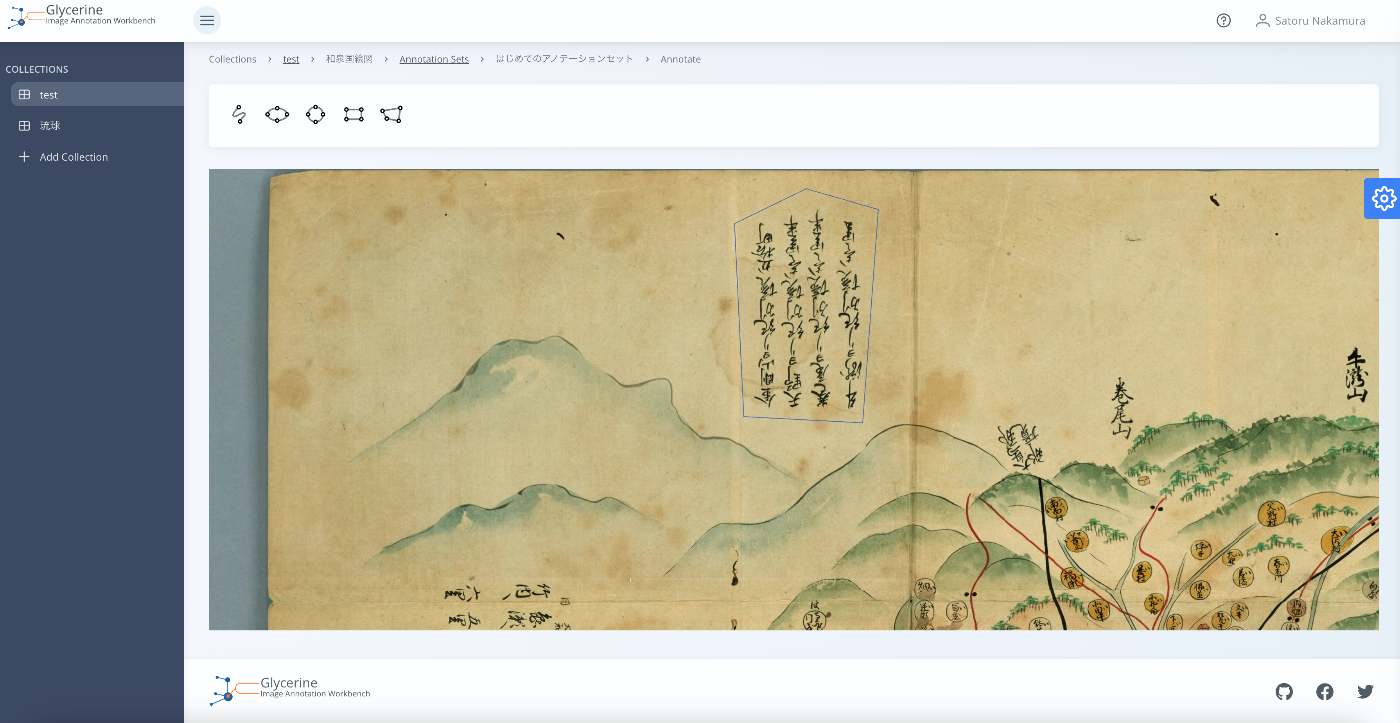
The only issue was that it did not provide a bulk export function for registered annotations. To address this, the tool developed here includes a function to bulk export annotations added by the logged-in user for the loaded IIIF manifest file.

This makes it easy to bulk export annotations added with this tool and use them in other visualization tools.
As introduced in the following article, the mirador-annotations plugin for Mirador 3 also provides a function to download added annotations. However, this function downloads on a per-Canvas basis, so when dealing with multi-page documents, annotations need to be downloaded page by page.
Implementation Notes and Development Memo
Here are some points of note from the development of this tool.
Support for IIIF Manifest v2 and v3 Input
The tool was designed to accept both v2 and v3 IIIF manifest files as input. To achieve this, @iiif/parser introduced in the following article was used.
When a v2 IIIF manifest file is provided as input, it is converted to a v3 manifest file using this library, unifying all internal processing to target v3 manifest files.
IIIF Types
For development with TypeScript, the following was used. It was convenient to be able to use IIIF types.
https://www.npmjs.com/package/@iiif/presentation-3
Annotorious FormatAdapter
Initially when using Annotorious, annotations were created in Annotorious’s proprietary format, and converting them to annotations compatible with the Mirador 3 mirador-annotations plugin was quite challenging.
Regarding this issue, as described in the following article, by applying a FormatAdapter such as W3CImageFormat, the annotation description format could be changed.
https://annotorious.dev/api-reference/format-adapter/
Using W3CImageFormat reduced the cost of the conversion work. As an example, it was used from Next.js as follows.
Summary
While there are many good tools for adding rectangular annotations to IIIF images, I could not find a suitable one for polygon annotations, so I developed the tool introduced here. I hope it serves as a reference for similar tool development.
Please note that the availability period of this tool is undetermined. If you use it, please use the “Export” function introduced in this article to save your annotations locally.