Introduction
Historical maps and classical documents contain characters oriented in various directions. This tool uses polygon annotations to accurately mark up tilted characters, and leverages the tilt information to retrieve rotation-corrected images via the IIIF Image API.
How Tilt Calculation Works
Vertex Order Rules
When creating polygon annotations, specify vertices in the following order:
- Top-left -> 2. Bottom-left -> 3. Bottom-right -> 4. Top-right
By following this counter-clockwise order, the tilt angle can be uniquely calculated.
Please also refer to the following demo video.
https://youtu.be/P9srTeynXuk?si=mJO1yu3IhR0QFV-2
Angle Calculation Method
The tilt angle is calculated from the vector of the top edge (top-left -> top-right):
Practical Examples
Example 1: Horizontal Text, Nearly Level
Annotation data:
Calculation:
Result:
- region:
9030,15590,1231,244 - rotation:
91
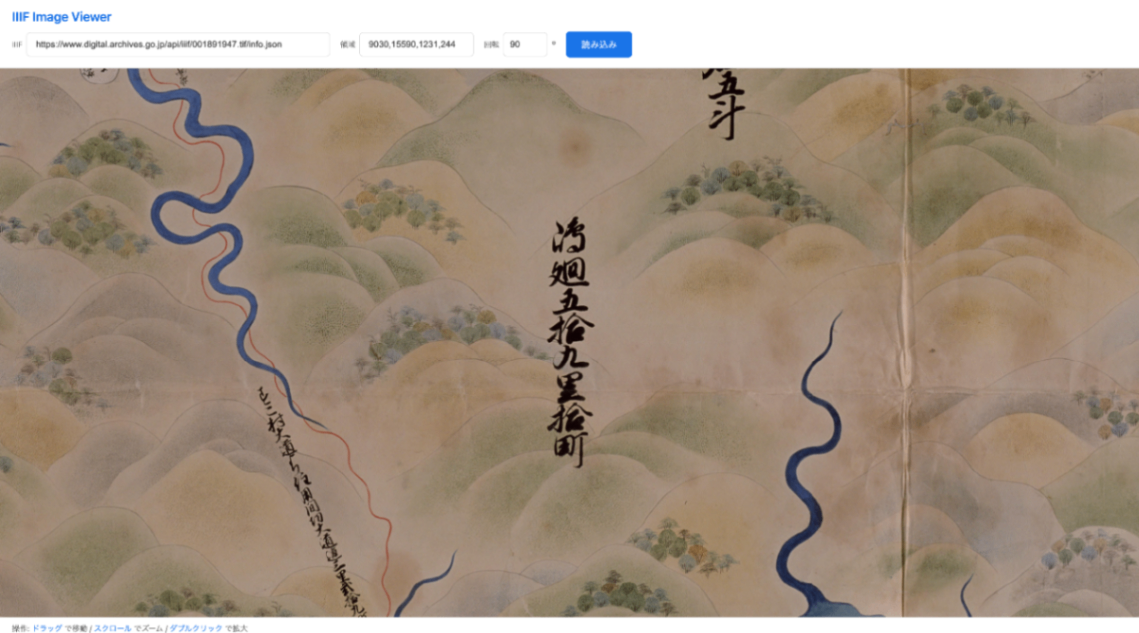
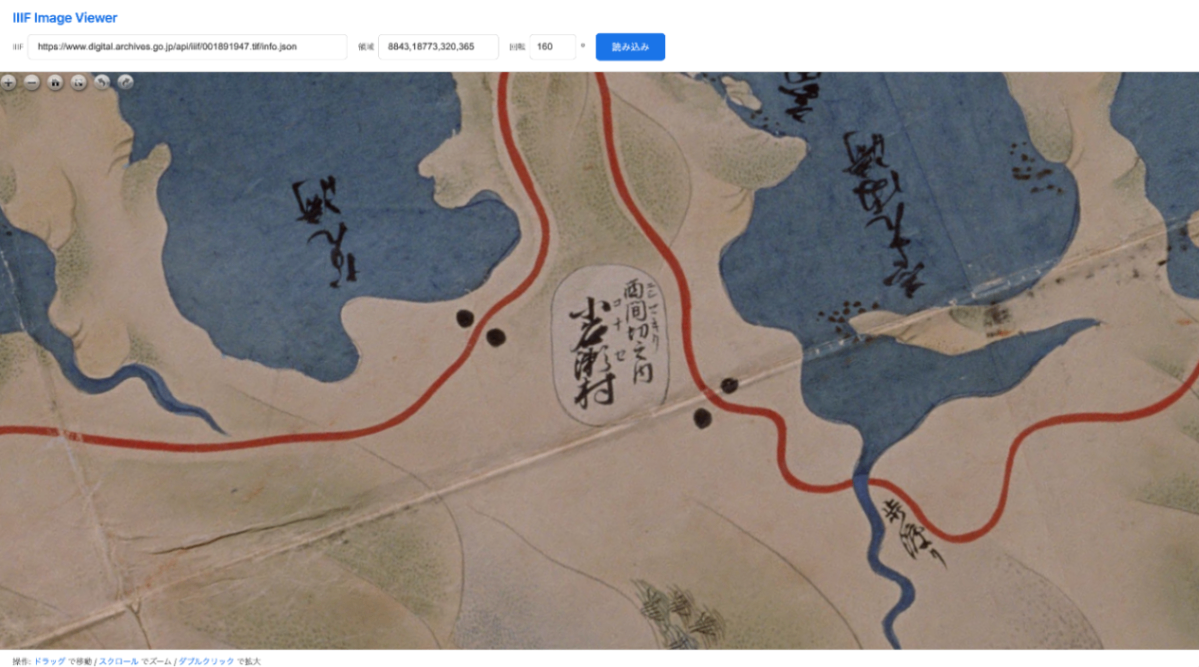
Example 2: Diagonally Tilted Characters
Annotation data:
Calculation:
Result:
- region:
8843,18773,320,365 - rotation:
160
Retrieving Images with the IIIF Image API
URL Structure
IIIF Image API URL structure:
Image Without Rotation
Tilt-Corrected Image
Retrieving with Transparent Background
To make the margins created by rotation transparent, use PNG format:
Note: For JPEG format, margins are filled with white.
Rotation Feature Support Status
The rotation feature of the IIIF Image API is not supported by all image servers. The IIIF Image API defines the following Compliance Levels:
| Level | Rotation Feature |
|---|---|
| Level 0 | Only 0 degrees |
| Level 1 | Only 0 degrees |
| Level 2 | 0, 90, 180, 270 degrees (arbitrary angles are optional) |
https://iiif.io/api/image/3.0/compliance/#33-rotation
https://iiif.io/api/image/2.1/compliance/#rotation
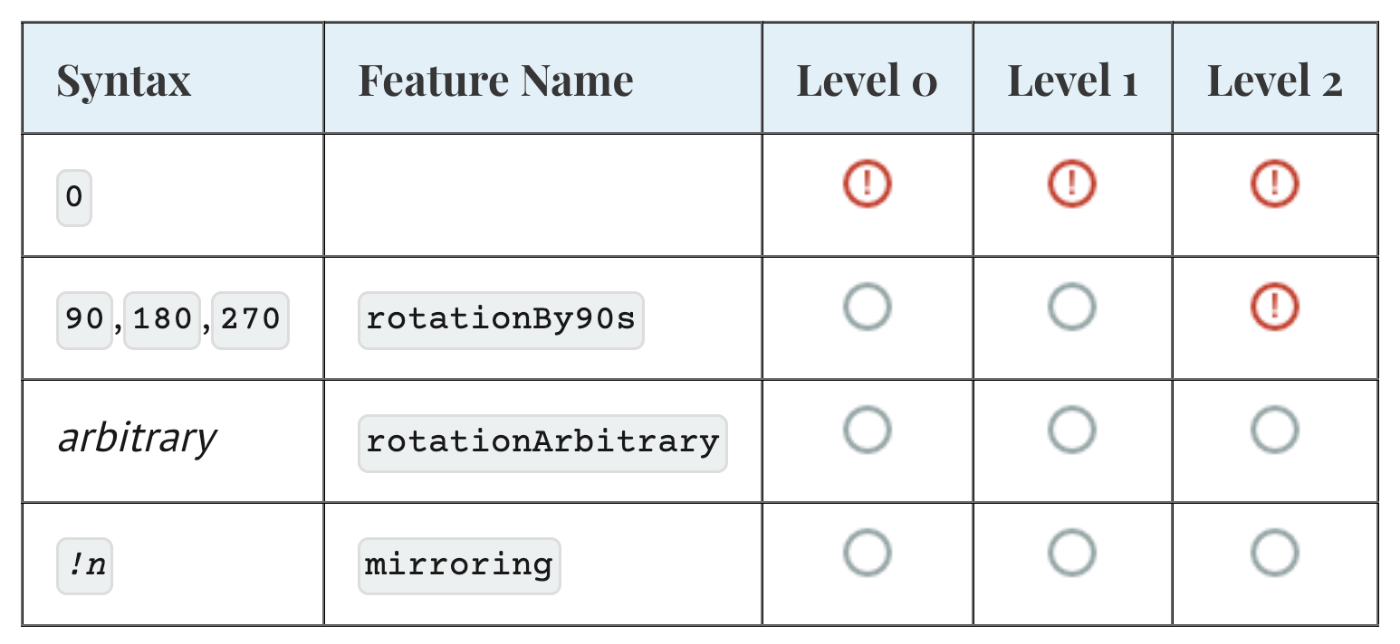
Many image servers operate at Level 1 or Level 2 and may not support arbitrary angle rotation. Support status can be checked in each image server’s info.json.
0
Only when rotationArbitrary is included is arbitrary angle rotation possible.
Display in IIIF Image Viewer
Even when the image server does not support rotation, you can view rotation-corrected images client-side using the IIIF Image Viewer. This viewer rotates images in the browser, so it does not depend on server-side rotation capabilities.
URL Parameters
| Parameter | Description | Example |
|---|---|---|
| iiif | IIIF Image API info.json URL | https://example.org/iiif/image/info.json |
| xywh | Crop region (x,y,width,height) | 8843,18773,320,365 |
| rotation | Rotation angle (degrees) | 160 |
Usage Example
Best Practices for Creating Annotations
1. Follow the Vertex Order
Always specify vertices in the order “top-left -> bottom-left -> bottom-right -> top-right.” If this order is broken, tilt calculation will not be performed correctly.
2. Be Aware of Character Orientation
Create annotations so that the reading direction of the characters (top edge) aligns with the “top-left -> top-right” line.
3. Include Some Margin
Including a slight margin rather than exactly fitting the character area improves readability.
Technical Background
Why Both FragmentSelector and SvgSelector Are Needed
- FragmentSelector: Bounding box (xywh) for cropping images with the IIIF Image API
- SvgSelector: Precise vertex coordinates for tilt calculation
With only FragmentSelector, tilt information is lost. With only SvgSelector, bounding box calculation is required. By keeping both, efficient processing is possible.
About IIIF Image API Rotation
The IIIF Image API rotation parameter:
- Clockwise is positive
- Range of 0 to 360
- Decimal values are also accepted
The rotated image may be larger than the original rectangle. This is because the smallest axis-aligned rectangle that contains the rotated rectangle is returned.