Introduction
When building digital archives with Omeka S, using standard vocabularies for metadata description improves data interoperability. This article explains the steps to register PROV-O (PROV Ontology), developed by W3C, in Omeka S.
PROV-O is an ontology for describing provenance information about data and digital objects, allowing structured recording of “who,” “when,” and “how” data was created or modified.
Prerequisites
- Omeka S (version 3.0 or later) installed
- Logged in with administrator privileges
- Internet connection environment (required for importing from external URLs)
Registration Steps
1. Accessing the Vocabulary Management Screen
- Log in to the Omeka S admin panel
- Click “Vocabularies” from the left menu
- Click the “Import new vocabulary” button in the upper right
2. Entering Basic Information
Enter the vocabulary basic information as follows:
| Item | Value |
|---|---|
| Label | PROV-O Ontology |
| Comment | W3C PROV-O (PROV Ontology) - A standard ontology for describing data provenance information |
| Namespace URI | http://www.w3.org/ns/prov# |
| Namespace prefix | prov |
Important: The namespace URI must end with # (hash). Forgetting this will prevent properties from being recognized correctly.
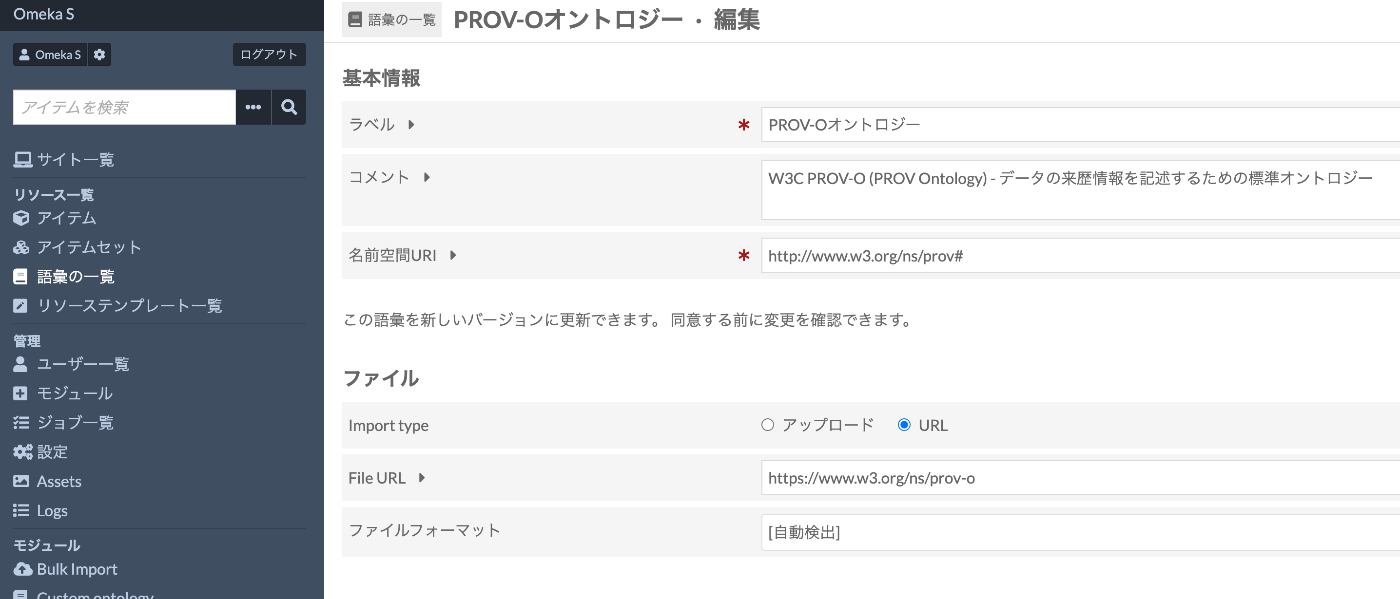
3. File Import Settings
Import type Selection
Select “URL” (it should be selected by default).
File URL Entry
Enter the following URL:
This URL supports content negotiation, and Omeka S will automatically fetch it in the appropriate format (Turtle).
File Format
“Turtle (.ttl)” will be automatically selected. No changes are needed.
4. Executing the Registration
- Confirm the entered information
- Click the “Import” button
- Wait for processing to complete (a few seconds to a few tens of seconds)
5. Confirming the Registration
Once registration is complete, the PROV-O Ontology will appear in the vocabulary list.
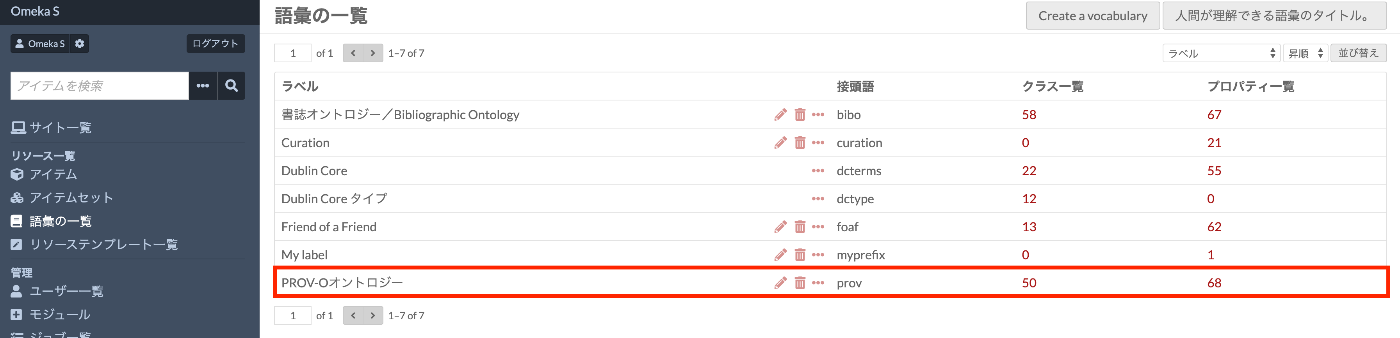
Clicking to view details, the following classes and properties should be registered:
Key classes:
prov:Entity- Entity (thing or concept)prov:Activity- Activity (process or action)prov:Agent- Agent (person, organization, software)
Key properties:
prov:wasGeneratedBy- How it was generatedprov:wasAttributedTo- Attribution targetprov:wasAssociatedWith- Associated agentprov:used- Used entity
Usage Example
Example of metadata description for an item using PROV-O:
Troubleshooting
If an Import Error Occurs
Check the network connection
- In environments that require proxy settings, check the Omeka S configuration
Verify the URL
- Confirm that
https://www.w3.org/ns/prov-ois correctly entered - If HTTPS is not accessible, try
http://
- Confirm that
Check the namespace URI
- Verify that the trailing
#is not forgotten
- Verify that the trailing
If Properties Are Not Displayed
- Check the “Properties” tab on the vocabulary detail page
- If necessary, delete the vocabulary and re-import
Alternative Import Method
If importing from URL does not work, import from a local file:
- Download the PROV-O Turtle file:
Select “Upload” for Import type
Select the downloaded
prov.ttlfile and import
Summary
By registering the PROV-O ontology, you can describe data provenance information in a standard format in Omeka S. This provides the following benefits:
- Improved interoperability: Easier data exchange with other systems
- Ensuring transparency: Clear recording of data creation and modification history
- Improved reliability: Ability to trace data origin and processing history
In building digital archives, the quality of metadata is extremely important. By utilizing standard vocabularies, you can build more valuable archives.
Reference Links
Updated: August 2025