Overview
This is a memo on how to store Omeka S files in mdx.jp object storage.
Base Module
We use the following module as a base, which enables integration with Amazon S3.
https://omeka.org/s/modules/AmazonS3/
This module provides an extension for storing media files such as images and videos handled by Omeka S in Amazon S3.
However, since it did not support specifying an endpoint, it was not possible to target object storage services like mdx.jp.
Customizing the Module
Based on the background described above, we customized the module to support object storage services other than Amazon S3. The customized version is available in the following repository.
https://github.com/nakamura196/Omeka-S-module-AmazonS3
For the customization, we used Cursor as the editor and submitted a request to claude-3.7-sonnet asking to “support S3-compatible object storage,” then applied the results.
As a result, by using the above module, media registered in Omeka S became accessible via URLs like the following:
https://s3ds.mdx.jp/
Below is an example of the files directory displayed in Cyberduck connected to mdx.jp.

The module settings are as follows. A new field called Custom Endpoint URL has been added, and by specifying https://s3ds.mdx.jp, it became possible to use mdx.jp object storage.

Note that as shown in the screen capture above, even when configured to store files in mdx.jp object storage, the message Wrong region. Please use region of a bucket: currently appears. This is planned to be fixed in the future.
Installing the Module
To install the custom module created by forking, you need to follow these steps:
When using modules from source in Omeka S, these steps are generally common.
References
As a module providing similar functionality in Omeka S, there is Any Cloud.
https://github.com/HBLL-Collection-Development/omeka-s-any-cloud
This also provides connectivity to Amazon S3 and, without needing customization, offered a field for entering an AWS Endpoint.

However, when entering the mdx.jp object storage information in these fields, the following error appeared on the item registration screen.
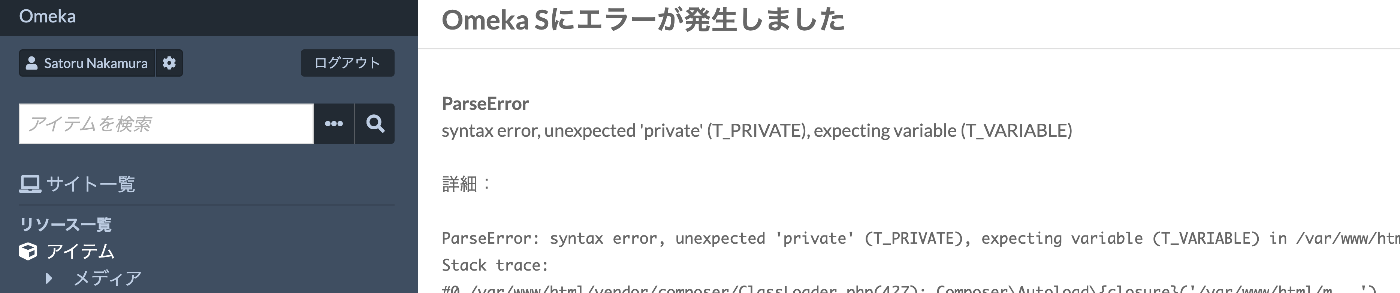
We plan to continue investigating the cause and resolution, but due to encountering this error, we chose to customize the Amazon S3 module rather than use Any Cloud.
Summary
Starting from fiscal year 2025, mdx.jp object storage will be available for free, making it a viable option for storing publicly accessible images in digital archives as well as for long-term preservation storage.
We hope this serves as a useful reference for building and utilizing digital archives.