Introduction
AtoM (Access to Memory) is an open-source web application for archival institutions. It provides descriptive management functionality compliant with international standards such as ISAD(G), ISAAR(CPF), and ISDF, and is used by libraries, archives, and museums worldwide.
AtoM ships with a standard REST API plugin called arRestApiPlugin, but it has the following limitations:
- Primarily centered on CRUD for information objects (archival descriptions), with limited coverage
- No API for Repositories, Authority records (Actors), or Accessions
- No API for Taxonomy (classification vocabulary) operations
- The Digital object upload API is not practical
- No API for Function descriptions
This does not meet business needs such as integration with external systems or batch registration through automated processing.
This article explains the implementation of arExtendedApiPlugin, which was developed to solve these issues.
There is also an article that executes actual business scenarios using this plugin: Building a Library Digital Archive with APIs – AtoM Business Scenario Practice Guide
Overview of arExtendedApiPlugin
Endpoint List (28 Endpoints Total)
| Resource | Method | Endpoint | Description |
|---|---|---|---|
| Summary | GET | /api/summary | Count of each entity |
| Repository | GET | /api/repositories | List (search/pagination) |
| GET | /api/repositories/:slug | Detail retrieval | |
| POST | /api/repositories | Create new | |
| PUT | /api/repositories/:slug | Update | |
| DELETE | /api/repositories/:slug | Delete | |
| POST | /api/repositories/:slug/logo | Logo upload | |
| DELETE | /api/repositories/:slug/logo | Logo delete | |
| Authority Record | GET | /api/actors | List |
| GET | /api/actors/:slug | Detail retrieval | |
| POST | /api/actors | Create new | |
| PUT | /api/actors/:slug | Update | |
| DELETE | /api/actors/:slug | Delete | |
| Accession | GET | /api/accessions | List |
| GET | /api/accessions/:slug | Detail retrieval | |
| POST | /api/accessions | Create new | |
| PUT | /api/accessions/:slug | Update | |
| DELETE | /api/accessions/:slug | Delete | |
| Taxonomy | GET | /api/taxonomies | List all taxonomies |
| POST | /api/taxonomies/:id/terms | Add term | |
| PUT | /api/taxonomies/terms/:id | Update term | |
| DELETE | /api/taxonomies/terms/:id | Delete term | |
| Function | GET | /api/functions | List |
| GET | /api/functions/:slug | Detail retrieval | |
| POST | /api/functions | Create new | |
| PUT | /api/functions/:slug | Update | |
| DELETE | /api/functions/:slug | Delete | |
| Digital Object | POST | /api/informationobjects/:slug/digitalobject | Upload |
Note: CRUD for archival descriptions (Information Objects) uses
POST/GET /api/informationobjectsprovided by the existingarRestApiPlugin.
Architecture
AtoM plugins are enabled from the admin panel (Admin > Plugins).
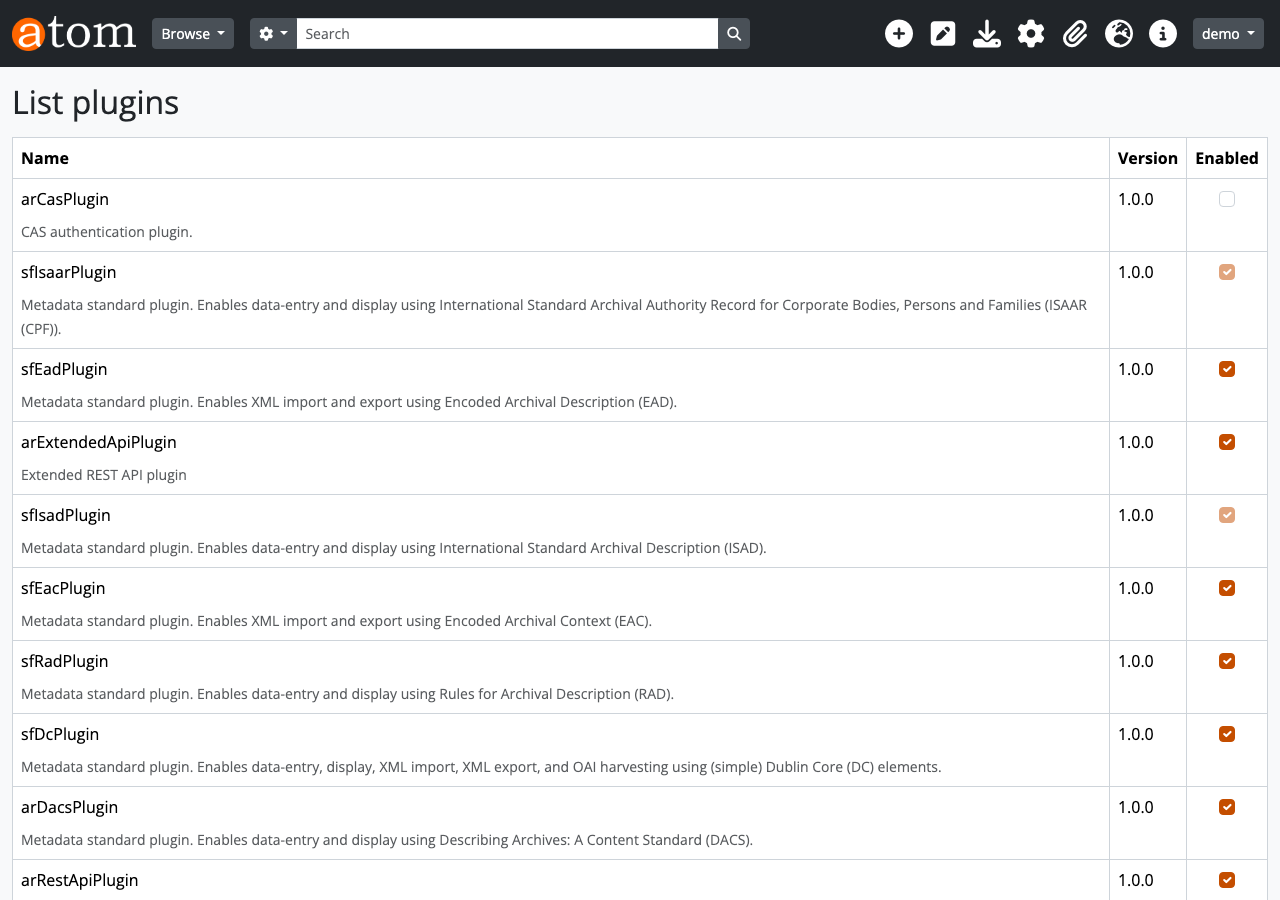
Implementation Key Points
1. Plugin Foundation: Configuration Class and Routing
AtoM plugins are created by inheriting from sfPluginConfiguration. The arExtendedApiPlugin configuration class hooks into the routing.load_configuration event to register routes.
2. Routing Priority Issue and Solution
AtoM’s arRestApiPlugin has a catch-all route called api_endpointNotFound that catches unknown API paths. Since Symfony routing uses first-come-first-served matching, adding routes via the usual routing.yml causes this catch-all route to match first.
Solution: Use insertRouteBefore() to insert routes before the catch-all route.
This ensures that requests like /api/repositories are routed to the correct action before reaching api_endpointNotFound.
3. CRUD Action Pattern
All actions inherit from QubitApiAction. They override get(), post(), put(), and delete() methods corresponding to HTTP methods.
The Update action inherits from the Create action and reuses the processField() method.
4. Digital Object Upload Notes
The point that caused the most trouble with digital object uploads was the usageId setting.
AtoM’s digital object processing pipeline (createRepresentations()) assumes that usageId is set to MASTER_ID to automatically generate reference copies and thumbnails.
Forgetting this setting causes the following cryptic error:
Examining the existing Web UI upload processing (multiFileUploadAction, addDigitalObjectAction) reveals that they all set $digitalObject->usageId = QubitTerm::MASTER_ID.
Pitfalls Encountered During Development
1. Routing Not Working – Getting Swallowed by endpointNotFound
Symptom: Accessing a new API endpoint always returns {"id":"endpoint-not-found"}.
Cause: arRestApiPlugin’s api_endpointNotFound catch-all route matches first.
Solution: Use insertRouteBefore('api_endpointNotFound', ...). Register routes dynamically in the routingLoadConfiguration event handler, not in routing.yml.
2. “orphaned derivative” Error During Digital Object Upload
Symptom: Got an orphaned derivative error during QubitDigitalObject::save().
Cause: $digitalObject->usageId was not set, causing the MASTER_ID check in createRepresentations() to be skipped, reaching the $this->parent check and erroring.
Solution: Set $digitalObject->usageId = QubitTerm::MASTER_ID;. Referring to AtoM’s Web UI upload processing confirms this setting is used everywhere.
3. Taxonomy Term ID Mismatch
Symptom: Specifying entity_type_id: 160 returns entity_type: "Published".
Cause: 160 is the term ID for Publication Status > Published. Actor Entity Types term IDs are in the 131-133 range. Taxonomy IDs and term IDs were confused.
Solution: Retrieve the full taxonomy list with GET /api/taxonomies and verify exact term IDs from the database.
4. Browse API Returns Empty Results
Symptom: results in GET /api/repositories is an empty array immediately after POST creation. total shows the correct count.
Cause: Browse actions query the database directly using Propel ORM, so they should reflect immediately. However, due to some AtoM caching mechanisms, temporary discrepancies can occur depending on transaction completion timing.
Solution: The Read API (GET /api/repositories/:slug) always returns the latest data for individual retrieval, so use this for verification immediately after creation.
5. Plugin Activation in Docker Environment
AtoM plugins are normally enabled from the Web UI’s “Admin > Plugins” screen, but in Docker environments, they can be enabled directly via SQL:
Note: This method is not documented in the official documentation. The official method is activation from the Web UI.
Coverage with Existing API + Extended API
| Operation Target | Existing API (arRestApiPlugin) | Extended API (arExtendedApiPlugin) |
|---|---|---|
| Information Objects | CRUD | - |
| Repositories | - | CRUD + Logo |
| Authority Records | - | CRUD |
| Accessions | - | CRUD |
| Taxonomies | - | Browse + Term CUD |
| Functions | - | CRUD |
| Digital Objects | Metadata only | base64/URL upload |
| Summary | - | Statistics |
Summary
Through the development of arExtendedApiPlugin, all major entities in AtoM can now be operated via REST API.
The key implementation points are:
- Routing: Use
insertRouteBefore()to insert routes before the catch-all route - Action pattern: Inherit from
QubitApiActionand override methods corresponding to HTTP methods - Create/Update reuse: Update inherits from Create and shares
processField() - Digital objects: Do not forget the
usageId = MASTER_IDsetting - Taxonomy IDs: Term IDs are database-specific values, so verify in advance with
GET /api/taxonomies
This plugin enables various use cases such as batch registration from external systems, creation of migration scripts, and test data insertion in CI pipelines.
The plugin source code is published on GitHub.
https://github.com/nakamura196/arExtendedApiPlugin
- 32 files, AGPL-3.0 license
- README.md includes both English and Japanese
- Can be managed independently from the AtoM main repository
The Future of AtoM
Release Status
AtoM is under active development. Multiple major releases were made between 2024 and 2025.
| Version | Release Date | Major Changes |
|---|---|---|
| 2.8.0 | January 2024 | Stable release |
| 2.9.0 | March 2025 | PHP 8.3 support, Elasticsearch 6.8.3 |
| 2.10.0 | September 2025 | Elasticsearch 7.10 support, Bootstrap 2 theme deprecation, logo/favicon/header color customization, accession CSV bulk export |
This article was tested on AtoM 2.8.x, but since the plugin structure depends on Symfony 1.x + Qubit Toolkit, it is expected to work on 2.9/2.10 as well.
Roadmap
Artefactual Systems publishes a roadmap in Now-Next-Later format.
Next (Planned):
- Code modularization – Improving extensibility through architecture improvements
- Theme management improvements – Making custom theme creation and management easier (unified on Bootstrap 5)
- Developer collaboration – Building a framework for developers outside Artefactual to contribute more easily
Later (Long-term Goals):
- AtoM 3 – The AtoM Foundation’s Roadmap Committee is proceeding with requirements definition and domain modeling. However, the development timeline is undetermined
- Records in Contexts (RiC) support – ICA’s new archival description standard replacing ISAD(G) and others
- Building a broader international developer ecosystem
Current Status and Future of the Standard REST API
AtoM’s standard arRestApiPlugin currently provides only 3 read-only endpoints.
| Endpoint | Overview |
|---|---|
GET /api/informationobjects | List/search archival descriptions |
GET /api/taxonomies | List taxonomy terms |
| POST (DIP upload) | Internal API for Archivematica integration |
The arExtendedApiPlugin developed this time fills this gap. Since there are no announcements for comprehensive REST API improvements in the AtoM 2.x series, plugin-based extension remains the practical approach for now.
When AtoM 3 is realized, it may include modern API design, but no specific specifications have been announced at this time.
Relationship with Archivematica
Artefactual Systems, the developer of AtoM, also develops the digital preservation system Archivematica.
- AtoM: Archival description and publication (public search catalog)
- Archivematica: Digital preservation (ingest, storage, long-term management)
The current integration is one-directional only, with DIP (Dissemination Information Package) upload from Archivematica to AtoM. Bidirectional synchronization is recognized as a future challenge.
Test environment for this article: AtoM 2.8.x (Docker), PHP 7.4, Percona 8.0, Elasticsearch 5.6