Overview
IIIF’s Linking to External Services includes Physical Dimensions.
https://iiif.io/api/annex/services/#physical-dimensions
It is described as follows.
For digitized objects, it is often useful to know the physical dimensions of the object. When available, they allow a client to present a ruler, or other rendition of physical scale, to the user.
For Mirador ver.2 and ver.3, the following plugins exist respectively.
ver.2
https://github.com/dbmdz/mirador-plugins#physical-document-ruler
ver.3
https://github.com/ubleipzig/mirador-ruler-plugin
Unfortunately, I was unable to successfully introduce the ver.3 plugin. Therefore, I will explain how to use the Physical Document Ruler with Mirador 2.
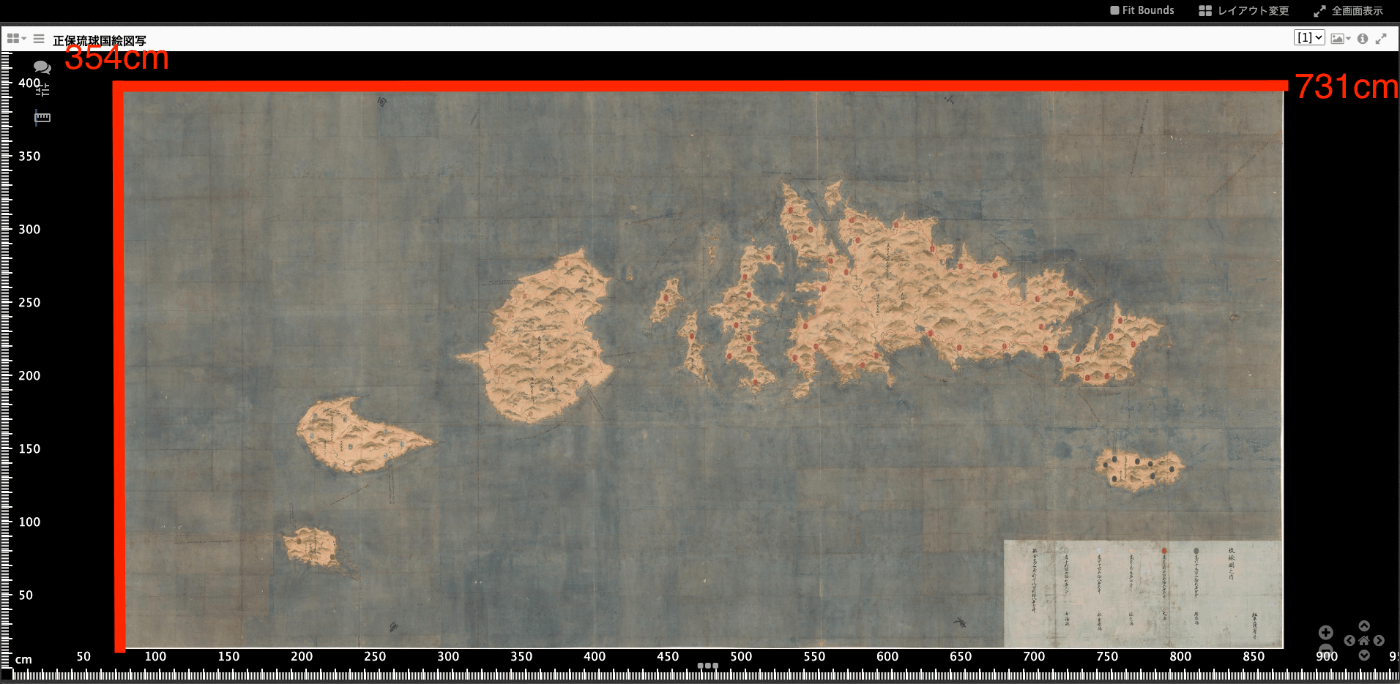
As a result, for example, when targeting the Shoho Ryukyu Kuni Ezu Copy (a large pictorial map held by the Historiographical Institute of the University of Tokyo, Call Number: S-Shimazu 76-2-4, Dimensions: 354.1 x 731.0 cm), a ruler can be displayed as shown below.
Preparing the Source Code
The source code can be obtained from the following repository.
https://github.com/nakamura196/mirador2
The Physical Ruler source code published at the following link has been copied to the Mirador 2 plugin folder mirador/plugins.
https://github.com/dbmdz/mirador-plugins/tree/main/PhysicalRuler
It is referenced in index.html as follows.
Data
Add a service to each Canvas in the manifest file. physicalScale uses the actual size (cm) divided by the number of pixels.
Results
You can view the results at the following URL. Clicking the ruler icon at the top left of the screen displays a ruler on the viewer.
Summary
This plugin states the following:
Due to technical limitations in the scanning process, the dimensions shown here are approximate. They are not suitable for purposes that demand scientific accuracy
Therefore, please note that the dimensions are approximate, but we hope this serves as a useful reference when viewing images together with their actual sizes.