The Omeka S Image Server module has a feature that dynamically generates tile images for uploaded images. By using this feature, users can simply upload JPG or PNG images, and Omeka will dynamically generate tile images according to requests, delivering images compliant with the IIIF Image API.
Note: On the other hand, when server specifications are limited, this dynamic tile image generation process may take time. In such cases, an option to pre-generate tile images is also available. This will be discussed later.
When using this dynamic tile image generation feature, a maximum image size is specified in the Image Server module settings screen. In the following example, dynamic tile image generation is performed for images of 20MB or less, and not performed for larger images.
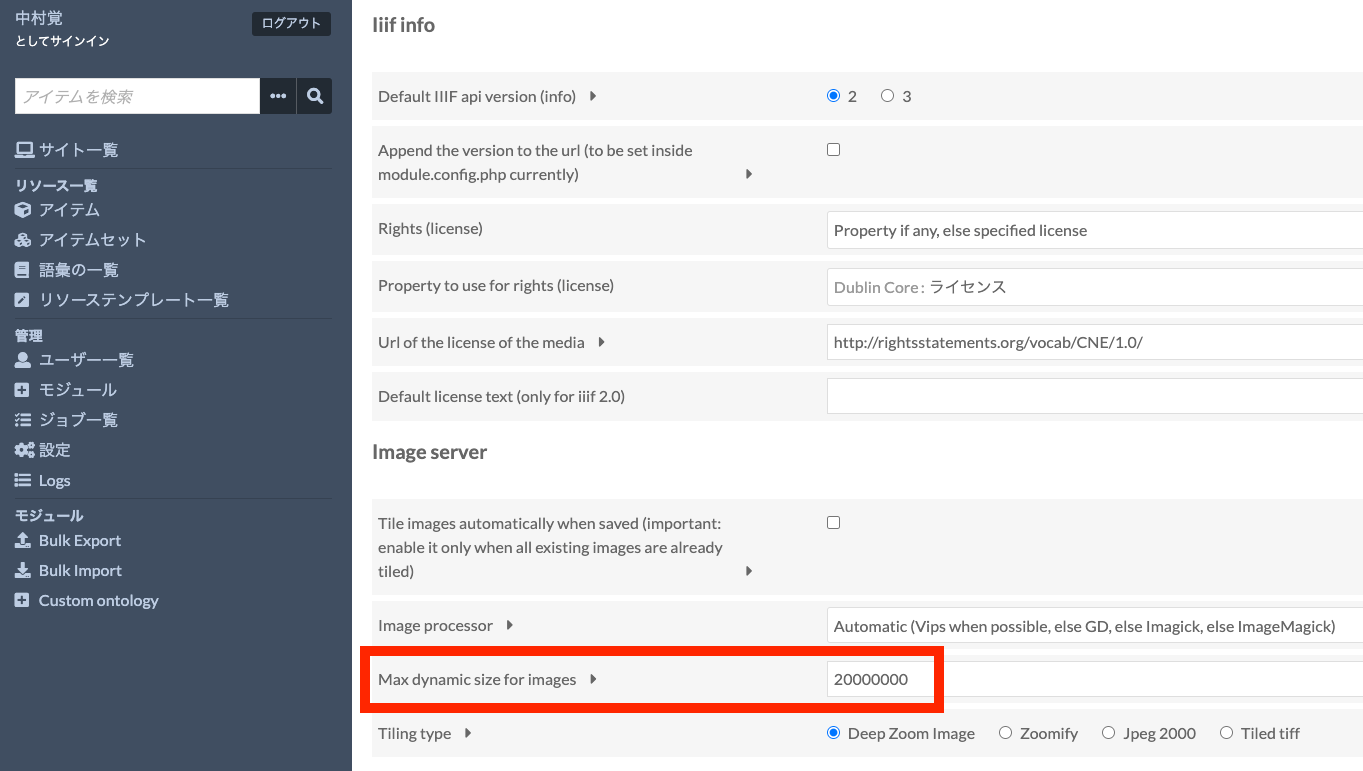
The default value is 10MB, and if an image larger than 10MB is uploaded, this limit setting prevents dynamic tile image generation, resulting in only low-resolution images being served. There have been cases where this issue was encountered. If you are experiencing a similar problem, I recommend checking whether your case falls under this scenario.
The module’s repository provides the following explanation. If the server has high specifications, dynamic tile image generation is possible even for images over 10MB, but otherwise, pre-generating tile images is recommended.
In case of big files, it is recommended to use vips or the command line version of ImageMagick, that is not limited by the php memory.
Furthermore, the limit of the size (10000000 bytes by default) can be increased if you have enough memory, so images won’t appear blurry even if they are not tiled. Vips bypasses this limitation.
https://github.com/Daniel-KM/Omeka-S-module-ImageServer#dynamic-creation-of-tiles-and-transformation
We hope this serves as a useful reference when using the Image Server module.