概要

Amazon EC2に立てたVirtuosoのヘルスチェックを行う機会がありましたので、その備忘録です。

具体的には、何らかの不具合で、Virtuoso(https://xxx.zzz/sparql など)がエラーを返すようになってしまった際、その内容をメールで通知します。

方法

以下の記事で、Amazon EC2にVirtuoso RDFストアを構築する方法を紹介しています。

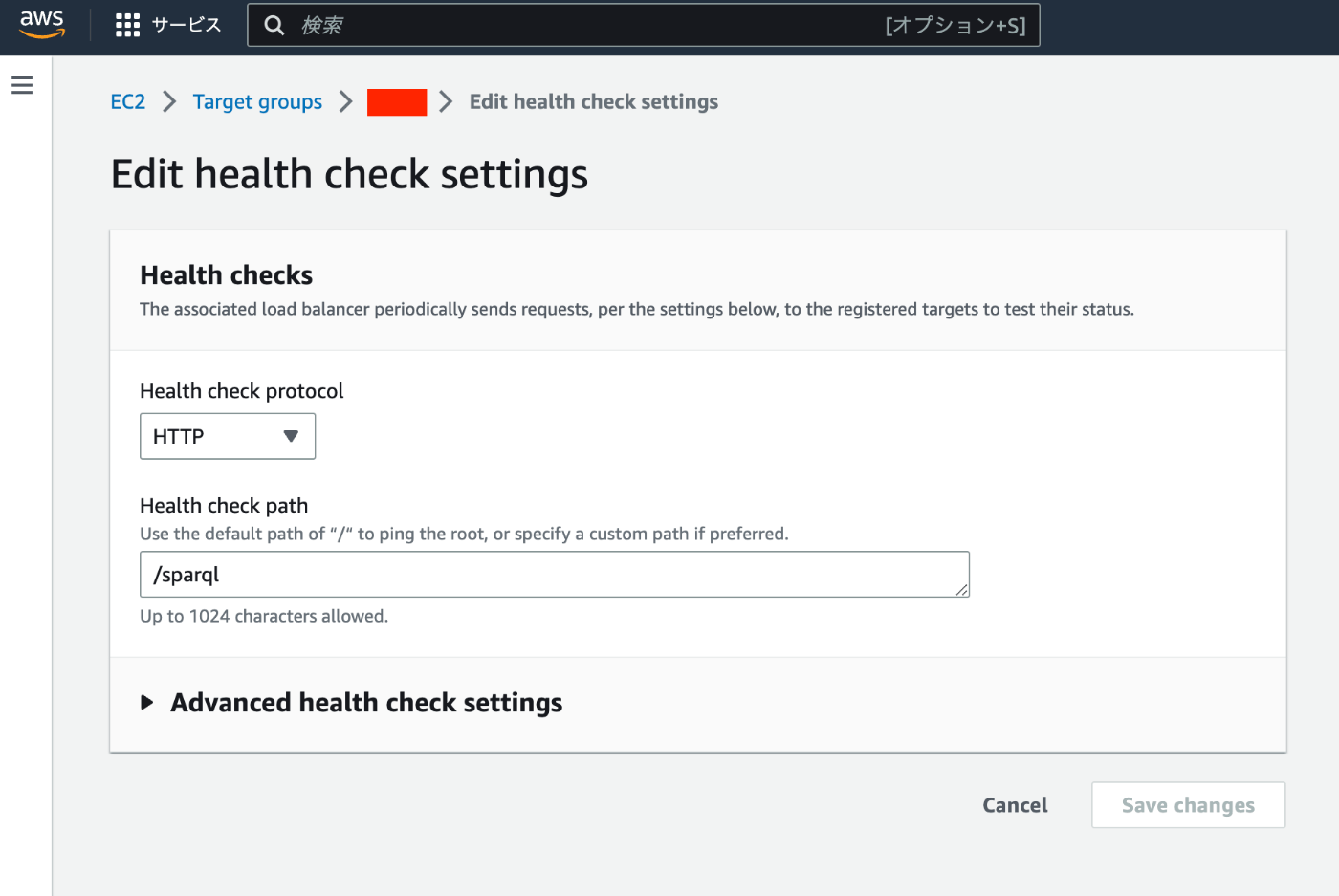
上記では、ELBを使用しています。上記の記事から1点だけ変更を行う必要があります。Health check path/に設定していますが、この部分をSPARQLエンドポイントへのパス(例えば/sparql)に変更します。
その後、以下の記事を参考に、CloudWatchやAmazon SNSの設定を行いました。

https://dev.classmethod.jp/articles/elb-healthcheck-monitoring-by-cloudwatch-alarm/

結果

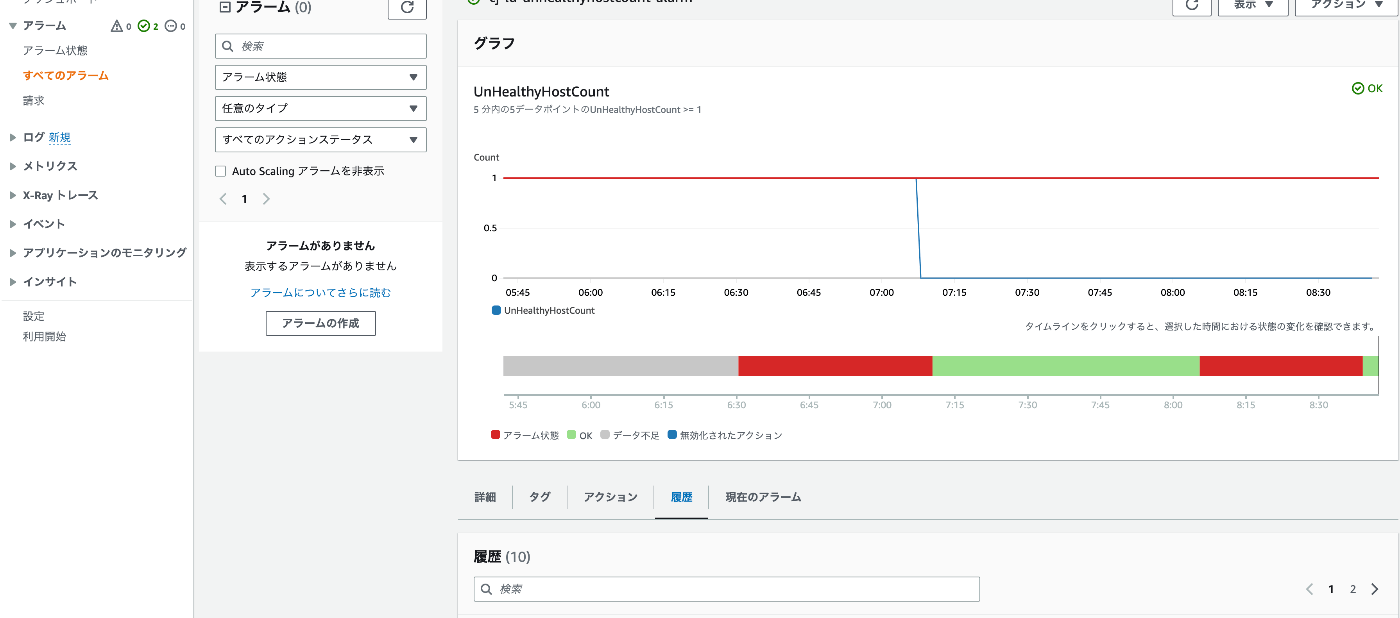
以下のようにモニタリングを行うことができるようになりました。

またアラート発生時には、以下のようなメールが届くようになりました。

YVhA------T-M-------S---oitlhotuetaNSRTAArTnMMDPSUTaOAIwprateiWlehieeietnrtKLNasmmaamSasetttmraiee:ASrt:etserhorreittaRUeh/D:eosAmoariinoi:tCMFi/entclleccsdsMh:FrsutCacAdadNNi:tiaIesahfmor:raaoisn[Cca-iaopunmMmmncsgaIelelnr:n:eees:ierEiaasgtits::nnNvrs:eS:srpgA:Timt:tiaDca_n-aiccatwDgi1tn:etisAn.e:ao:Ttct:nsAhtoChsn:ihnhe:ssesa:onAueAlgLsmWeeA-aS.:ReiaMalMwsasstbn.t-eaavOTFxaa1cgmiKhrxrt:aearrixnexumztedx:xseousaxawxennohyxwhxt.sAoxsexycoLl1x:nxoCo-Ad4xcxuomuRxltAU[6Mnbxrn/nMCJxohWnT0iorxschruxueSHantexAoleolxd/ersiaxmloasyxwmAagemscxaeuls,aeplecuphxz:dtettpttomeixowhd2crlhGncn:nay:0hiiyrdigDth2:ccHosfeCcon3uaouiflhsositspeao/t0-sitduudcd8eoC=ldeoa:aGnotWeut0srEut_apna5teLnaCtltp:-aBtrlci-o31tgohnai0:eeuklnxrtdA.atUxTgWljrsTxhraasmCxaotr?wxnucmrexOpherxr/_"gexEvAvixqiliorxurarnexatrt=cxlumuuexTososixos_s-v:ToToeeah]o-adlrpusae[intfrsAch-omhv]e1r:oaa#vlila5idltlrahapt1byreu.ihmro0losisisVooftt2d-oyc:surZoanoulahannanetetrda-mll=a/5telvhauaimyssrriht-mtsoe"uss5aoitsisncotnogof--u1tudntahnath]eht-eeaa[UapllLSloaaotirsaEhnmtdaytBshs5atolswpa(teenNcrrc.oeieuorVntditr(=r-esgaa)ailtpnaeopirdf/amv)a6is0rrte[sugBeoircsoeoonan/cdyhhsyai.ysnygye]yn.ytyeyryeydyytyhye]ALARMstate,because"ThresholdCrossed:nodatapointswerereceivedfor5periodsand5missingdatapointsweretreatedas[Breaching]."at"Friday14July,202308:05:30UTC".

まとめ

同様の環境でVirtuosoを運用されている際の参考になりましたら幸いです。