Snorql — A Browser-Based UI for Exploring Multiple SPARQL Endpoints
https://nakamura196.github.io/snorql/
はじめに / Introduction
SPARQL エンドポイントを手軽に試せるツールが欲しい ── そう思ったことはありませんか?
Have you ever wanted a quick, easy way to try out SPARQL endpoints?
SPARQL は Linked Open Data (LOD) を検索するための標準クエリ言語ですが、エンドポイントごとに UI が異なったり、そもそも UI が用意されていなかったりします。そこで、1 つの統一的な UI から複数のエンドポイントを切り替えて使える ツールとして Snorql を公開しました。
SPARQL is the standard query language for searching Linked Open Data (LOD), but each endpoint often has a different UI — or none at all. To solve this, I published Snorql, a tool that lets you switch between multiple endpoints from a single, unified UI.
https://nakamura196.github.io/snorql/
Snorql とは / What is Snorql?
Snorql はもともと kurtjx/SNORQL として公開されていた SPARQL Explorer を、@masaka 氏が Japan Search 向けに大幅に拡張したものです。本リポジトリでは、そのコードベースをさらに再構成し、複数のエンドポイントに対応するマルチテナント構成 としています。
Snorql is originally based on kurtjx/SNORQL, significantly extended by @masaka for Japan Search. This repository reorganizes the codebase into a multi-tenant architecture that supports multiple SPARQL endpoints.
主な機能 / Key Features
| 機能 / Feature | 説明 / Description |
|---|---|
| CodeMirror エディタ | SPARQL のシンタックスハイライト・括弧マッチング付きエディタ / SPARQL editor with syntax highlighting and bracket matching |
| 複数の結果表示 | Browse(テーブル)・JSON・XML の 3 形式 / Three output formats: Browse (table), JSON, XML |
| リソース詳細表示 | URI をクリックすると DESCRIBE クエリで詳細を展開 / Click a URI to expand its details via DESCRIBE |
| Leaflet 地図表示 | 座標データを含む結果を地図上にプロット / Plot results with coordinates on a Leaflet map |
| サンプルクエリ | サイドバーからワンクリックでサンプルクエリを実行 / One-click sample queries from the sidebar |
対応エンドポイント / Supported Endpoints
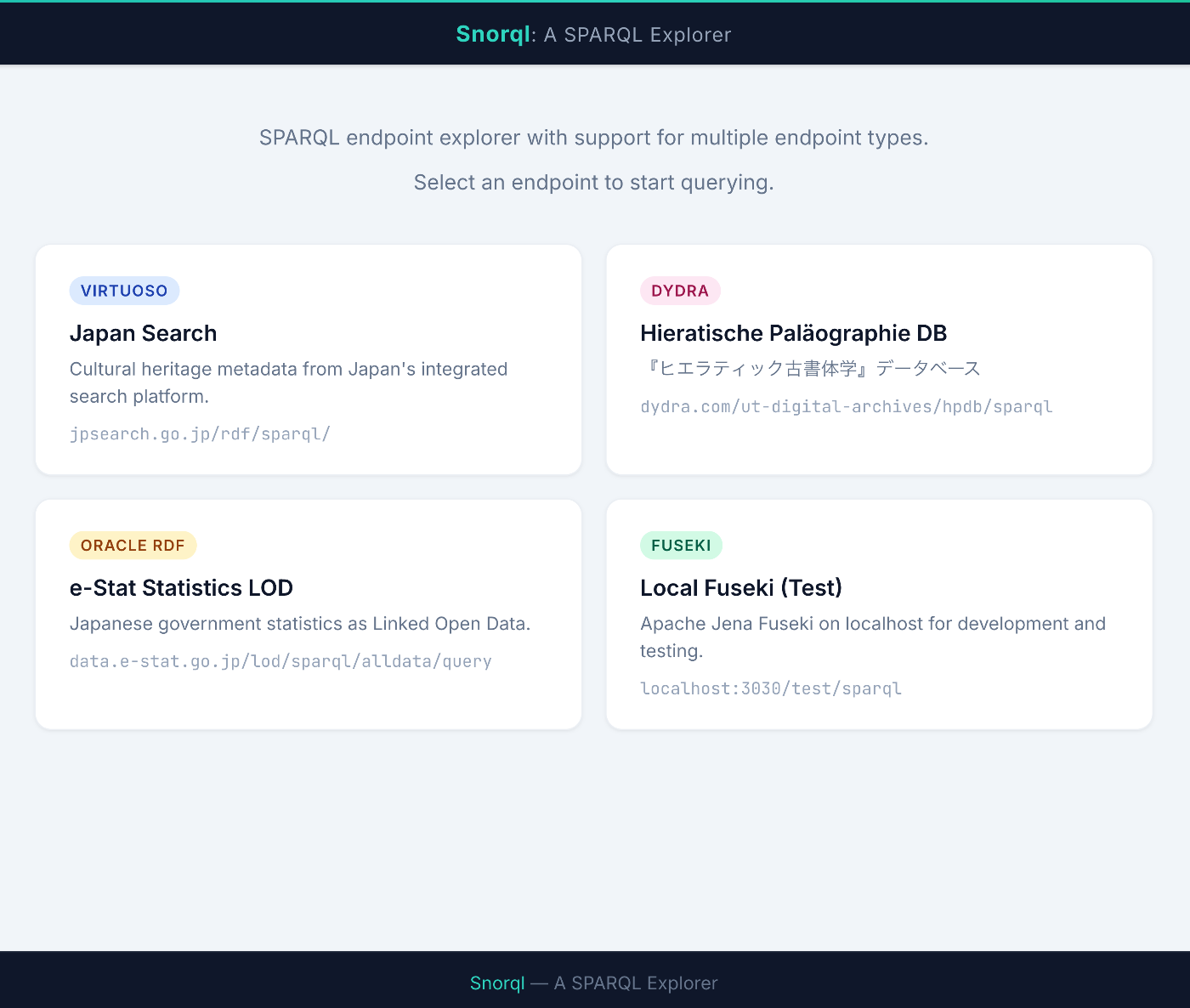
現在、以下の 4 つのエンドポイントをプリセットしています。
The following four endpoints are preconfigured:
| エンドポイント / Endpoint | 種別 / Type | 説明 / Description |
|---|---|---|
| Japan Search | Virtuoso | 日本の文化財メタデータ統合検索 / Integrated search for Japanese cultural heritage metadata |
| Hieratische Paläographie DB | Dydra | 『ヒエラティック古書体学』データベース / Hieratic palaeography database |
| e-Stat 統計LOD | Oracle RDF | 日本の政府統計 LOD / Japanese government statistics as LOD |
| Local Fuseki | Fuseki | ローカル開発・テスト用 / For local development and testing |
ランディングページからカードを選択するだけで、各エンドポイントの Explorer に遷移できます。
Simply select a card from the landing page to navigate to the Explorer for each endpoint.
アーキテクチャ / Architecture
ディレクトリ構成 / Directory Structure
GitHub Pages で直接公開できるよう、docs/ をルートとした構成にしています。
The project uses docs/ as the root, enabling direct publishing via GitHub Pages.
共通コードとエンドポイント固有設定の分離 / Separation of Shared Code and Endpoint-Specific Config
共通の JS・CSS は js/ と css/ に配置し、各エンドポイントフォルダにはそのエンドポイント固有の 3 つの設定ファイル だけを置きます。
Shared JS and CSS live in js/ and css/, while each endpoint folder contains only three configuration files specific to that endpoint:
この構成により、新しいエンドポイントの追加は既存フォルダのコピー + 3 ファイル編集だけ で完了します。
With this structure, adding a new endpoint is just a folder copy + editing 3 files.
エンドポイント種別ごとの差異吸収 / Handling Endpoint Differences
SPARQL の仕様は共通でも、エンドポイントの実装によって応答形式や対応するクエリ種別が異なります。Snorql では snorql_def.js の設定だけでこの差異を吸収します。
Although the SPARQL specification is common, response formats and supported query types differ across endpoint implementations. Snorql absorbs these differences through configuration in snorql_def.js alone.
主な差異は 2 点です。
There are two main differences:
1. JSON 取得方式 / How to request JSON responses
| 方式 / Method | 対象 / Used by | 仕組み / Mechanism |
|---|---|---|
output=json パラメータ | Virtuoso, Dydra, Oracle RDF | URL に output=json を付与 / Append output=json to URL |
Accept ヘッダ | Fuseki | HTTP ヘッダで application/sparql-results+json を要求 / Request via HTTP Accept header |
この切り替えは endpoint_type から自動決定されます。"fuseki" なら Accept ヘッダ、それ以外("virtuoso", "any")なら output=json パラメータを使います。
This is automatically determined by endpoint_type: "fuseki" uses the Accept header, while others ("virtuoso", "any") use the output=json parameter.
2. DESCRIBE クエリの対応状況 / DESCRIBE query support
| 種別 / Type | DESCRIBE の挙動 / DESCRIBE behavior |
|---|---|
| Virtuoso (JPS) | DESCRIBE がエラーになるため、内部で CONSTRUCT に変換 / DESCRIBE errors; internally converted to CONSTRUCT |
| Dydra | そのまま動作 / Works as-is |
| Fuseki | そのまま動作 / Works as-is |
| Oracle RDF | DESCRIBE/CONSTRUCT が JSON 非対応のため、内部で SELECT に変換 / DESCRIBE/CONSTRUCT cannot return JSON; internally converted to SELECT |
これらの差異は snorql_def.js 内の endpoint_type と数個のフラグで制御されるため、利用者はエンドポイント URL とこれらの設定を指定するだけで済みます。
These differences are controlled by endpoint_type and a few flags in snorql_def.js, so users only need to specify the endpoint URL and these settings.
使い方 / How to Use
オンラインで試す / Try Online
以下の URL にアクセスするだけですぐに使えます。
Just visit the URL below to start exploring:
https://nakamura196.github.io/snorql/
ローカルで動かす / Run Locally
自分のエンドポイントを追加する / Add Your Own Endpoint
Fuseki でローカル開発 / Local Development with Fuseki
Docker Compose で Apache Jena Fuseki を起動できます。
You can start Apache Jena Fuseki with Docker Compose:
技術スタック / Tech Stack
フレームワークなしの Pure CSS — Bootstrap / Tailwind を使わず、単一の
snorql-modern.cssですべてのスタイルを管理。外部依存ゼロで常に動作します。Pure CSS, no framework — A single
snorql-modern.csshandles all styles without Bootstrap or Tailwind. Zero external dependencies means it always works.CodeMirror 5 (CDN) — SPARQL シンタックスハイライト / SPARQL syntax highlighting
Leaflet (CDN) — 地図表示 / Map display
GitHub Pages —
docs/フォルダをそのまま公開 / Publish thedocs/folder directly
まとめ / Summary
Snorql は SPARQL エンドポイントを気軽に試すための軽量な Explorer UI です。
Snorql is a lightweight Explorer UI for casually trying out SPARQL endpoints.
- 複数エンドポイントを 1 つの UI で切り替え / Switch between multiple endpoints in one UI
- フォルダコピーだけで新しいエンドポイントを追加 / Add new endpoints by simply copying a folder
- GitHub Pages でそのまま公開可能 / Publish directly on GitHub Pages
- フレームワーク不要、Pure CSS + Vanilla JS / No framework needed — Pure CSS + Vanilla JS
LOD を触ってみたい方、自分のエンドポイントの Explorer が欲しい方はぜひ使ってみてください。
If you want to explore LOD or need an Explorer for your own endpoint, give it a try.
GitHub: https://github.com/nakamura196/snorql
Demo: https://nakamura196.github.io/snorql/
謝辞 / Acknowledgments
- SNORQL — Richard Cyganiak / kurtjx
- snorql_ldb.js — @masaka (Japan Search 向け拡張 / Extensions for Japan Search)
- CodeMirror — SPARQL エディタ / SPARQL editor
- Leaflet — 地図表示 / Map display